打造华尔街自主协作伙伴:自定义技能、连接器和事件钩子
Coding an Autonomous Wall Street Coworker: Custom Skills, Connectors, and Event Hooks
原文由官网提供,中文由 GPT-6 Luna 翻译。相邻片段合并排版,正文与时间点保持对应。
已插入 28 张经核对的幻灯片或演示截图;点击图片可放大。图注链接为当前视频时间,左侧正文时间保留原转录版本,二者可能不同。
共 35 个阅读段落
大家好,我叫 Philipp,在 [听不清] 工作。祝大家 Gemini 4 发布日第二天愉快。你们当中有谁已经试过新模型?可以举手吗?好,举手的人还不够多。所以稍后大家一定要花点时间试试看。真的很不错。我们也会在演讲中使用它并进行展示。我们要看看如何构建并编写自己的华尔街自主协作伙伴。希望现场有很多金融从业者,或者在金融领域工作的工程师。
Hi everyone, my name is Philipp and I work at [unclear] and happy second Gemini 4 day. So who of you already tried the new model? Can you raise your hands? Okay, that's not enough. So you should definitely take your time later, try it. It is really good. We are going to use it and show it in our talk as well. So we are going to look at how you can build and code your own autonomous Wall Street co-workers. so hopefully we have many finance people or engineers working in finance here.
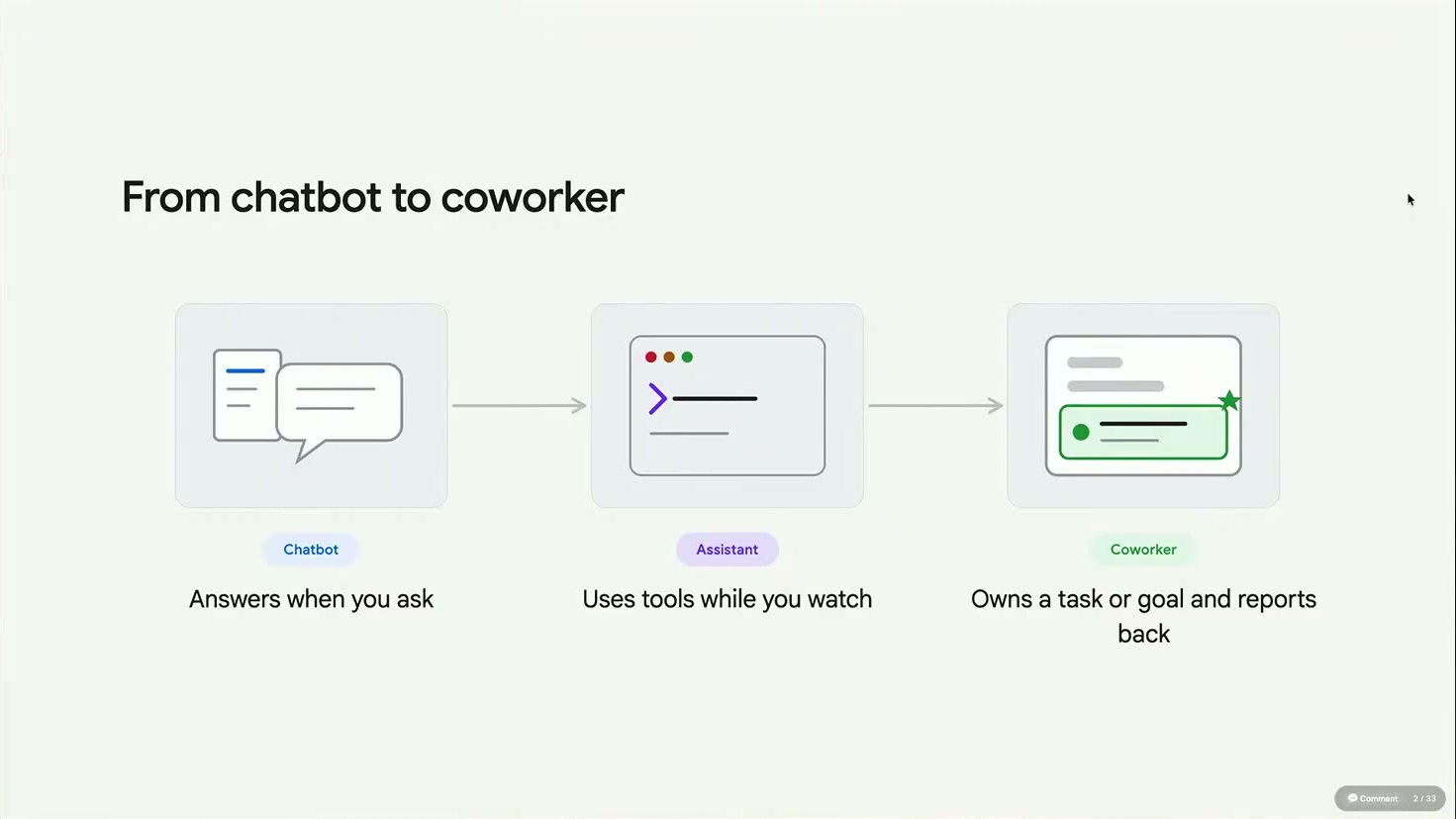
在介绍我们的背景之前,先简单说一下,两年前,我们基本上只有一个聊天框。我们会问一些简单的问题,比如法国的首都是哪里,上一届欧洲杯是谁赢的。后来我们开始在自己的电脑上使用工具来辅助工作,出现了第一批能替我们编写代码的编程智能体。现在我们正在迈入自主协作伙伴阶段,本质上就是创建一位数字员工,给智能体一台自己的电脑,交给它一项任务,希望几小时后回来时,它已经交付了不错的结果。
So quickly before we go into where we are coming from, two years ago we basically had a chat box. We asked some simple questions like what's the capital of France, who won the last European championship. Then we moved to assistance using tools on our own computer, having the first coding agents writing code for us. And now we are moving into this autonomous co-worker area where we basically give or create a digital employee where we give an agent its own computer, give it a task, and hopefully come back a few hours later with a good result.
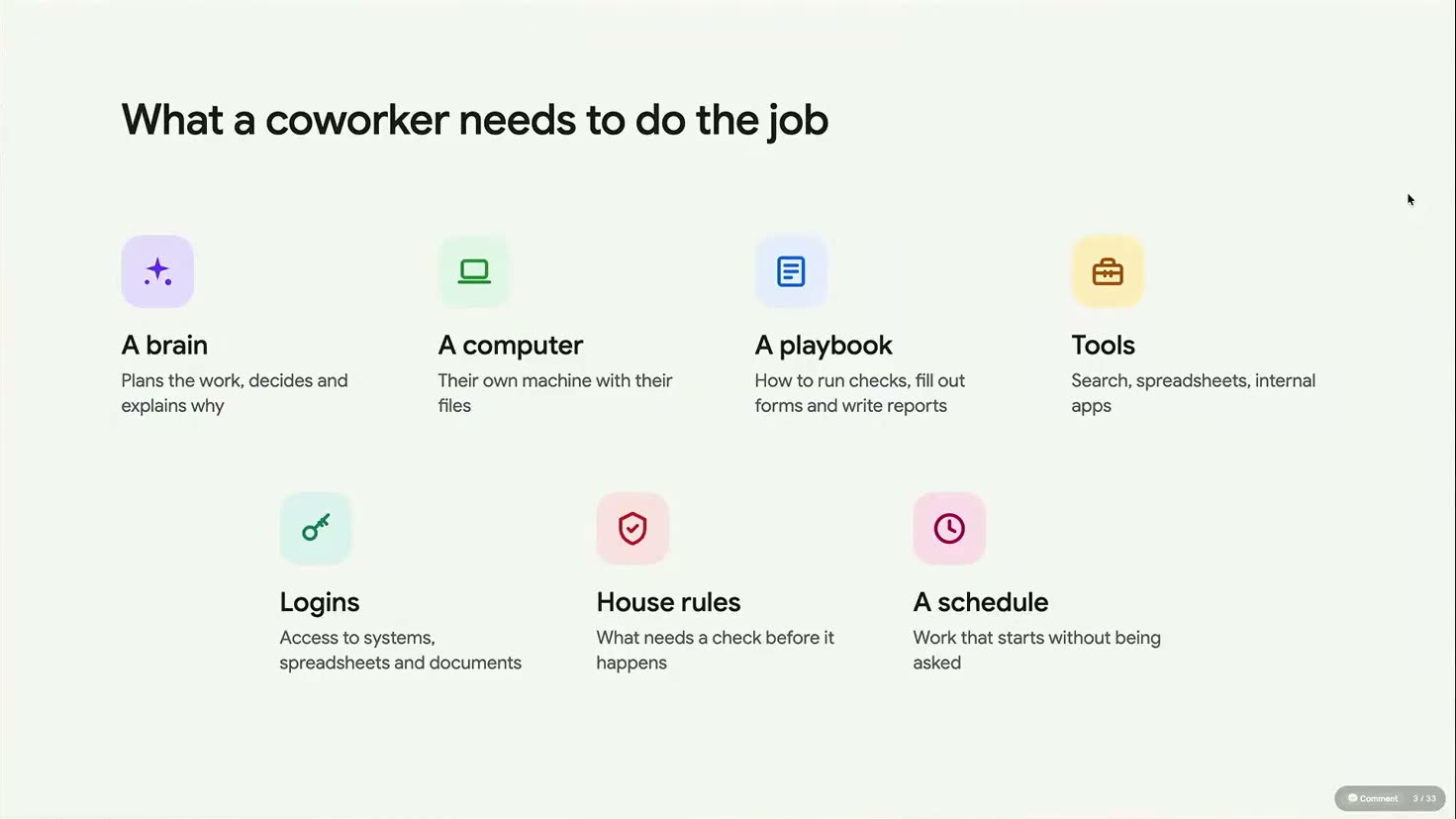
那么,一个协作伙伴通常需要什么?我觉得 AI 和我们人类都一样。我们需要一个大脑来完成工作。我们需要一台电脑来保存自己创建的成果,并在上面反复修改。我们还需要某种新的工作手册,对吧?新员工刚入职时,对你的工作环境和领域都不熟悉;你可能有特定的工作流程,所以你需要工作手册,也需要工具帮助他们完成工作。他们还需要某种形式的凭证;此外,也可能有特定的公司规则,规定你应该做什么、不应该做什么,哪些事可以自行处理,哪些事需要获得批准;当然,希望也有工作时间表,规定何时可以开始工作,智能体也是如此。我们会逐一讲解这 7 个步骤,以及如何在这场演讲中用 Gemini 构建自己的数字协作伙伴。
So what does a co-worker normally need? And I think that goes for AI and for us humans as well. We need a brain to be able to do our work. We need a computer where we can save artifacts we create, where we can iterate. We need some kind of a new playbook, right? when you hire someone new they are new to your environment to your domain you might have specific workflows so you need playbooks we need tools for them to be able to do that job they all need credentials in one or the other way then there might be some specific house rules on what you should do or what you should not do what you can do on your own or where you need to get some approvals and then of course there are hopefully some schedules for working hours when you can come in or when you have to work. And the same goes for our agents. And we are going to work through all of those seven steps and how you can build your own digital co-worker with
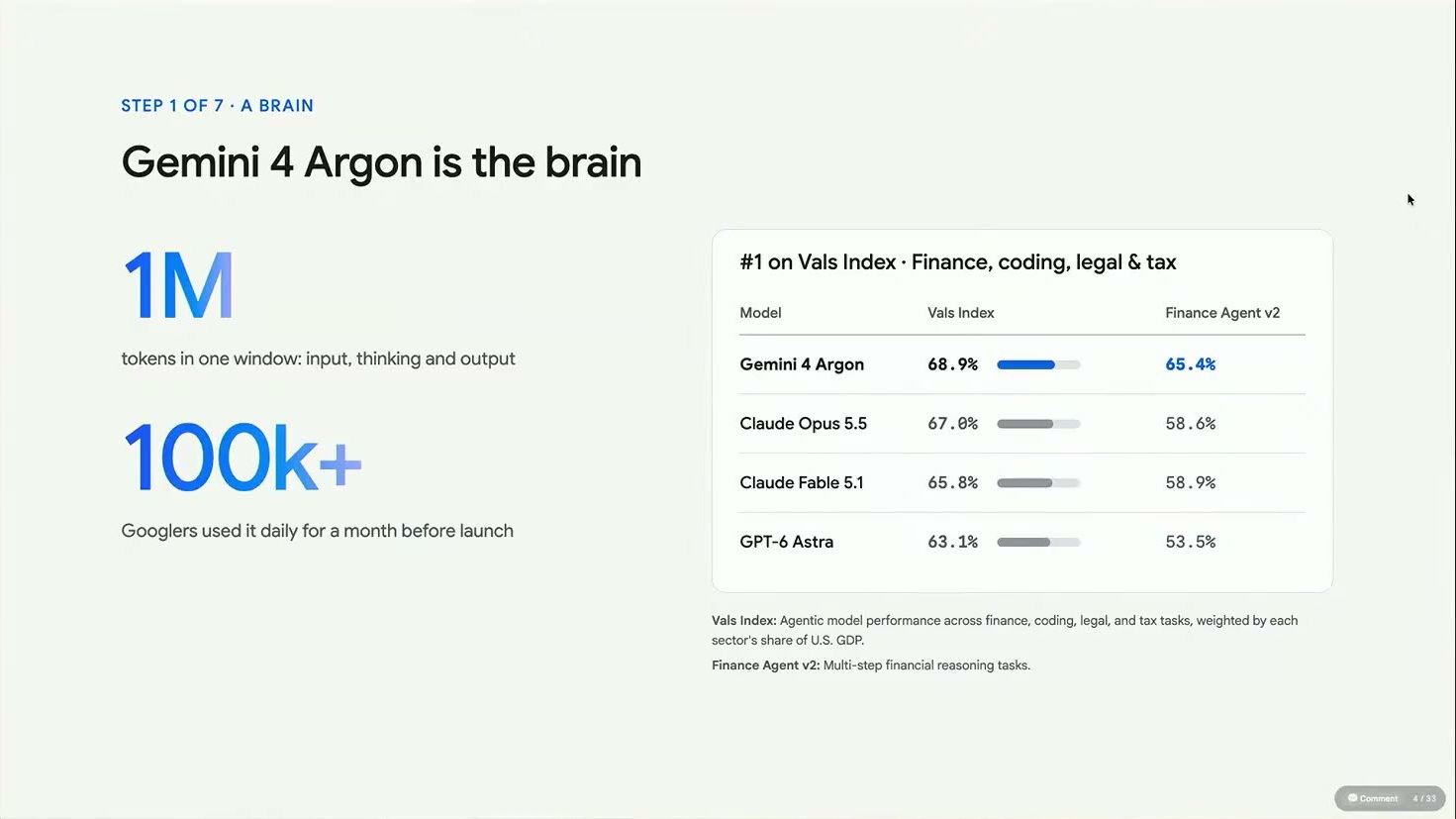
不过在开始之前,昨天是个大日子。我们发布了 Gemini for Argon,并向大家开放。主要新功能之一是拥有 100 万的统一上下文窗口。这意味着 Gemini 最多能生成 100 万个输出 token。我们还看到,数学和推理任务有明显提升;现在模型有超过 64k 个token 可用于思考、逐步推理证明,以及进行数学推导。另外也很不错的是,我们对这个模型做了大量测试,所以知道它的表现。大家总会想:“Gemini 只是刷基准测试”,但这个模型真的很强,大家一定要试试。
Gemini in this talk. But before we go in, yesterday was the big day. We announced Gemini for Argon and made it available to you. Biggest new features, we have now a 1 million unified context window. This means Gemini can generate up to 1 million output tokens. And we see strong improvements especially on math and reasoning tasks where the model now has more than 64k token available to think to work through to reason through some proofs and for math for for math and then very also very good is like we tested that model heavily so we know there are always some thinking around hey gemini is just banks benchmarks but the model is really good you should definitely give it a try.
我们在 Google 内部广泛使用它。已经有许多 Google 员工开展了项目,并使用了它。
We use it extensively at Google. There are already many projects by Google employees who have used it.
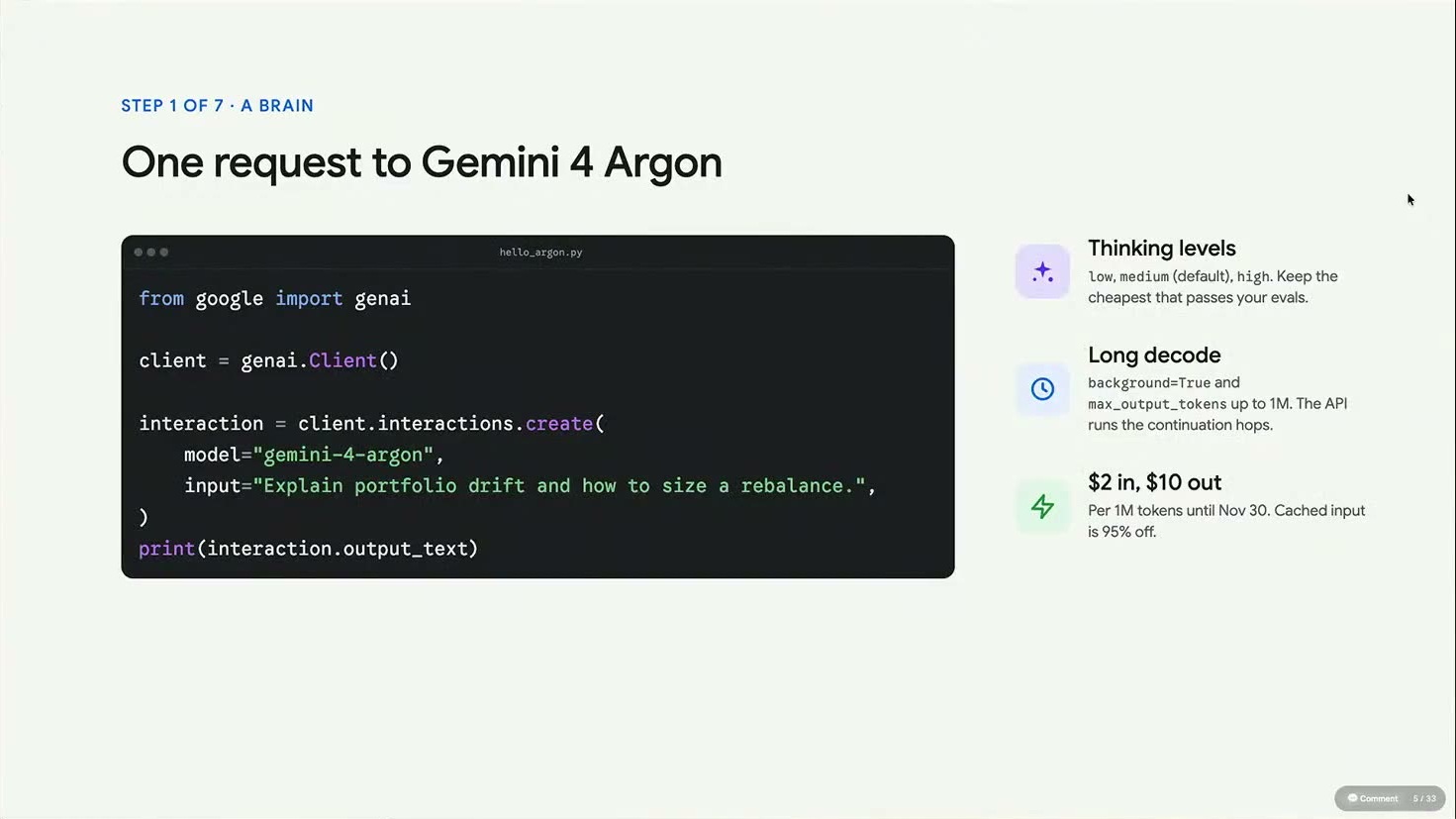
最简单的入门方式是 Interactions API。总共只要 4 行代码,你只需在 AI Studio 获取 API 密钥,网址是 aistudio.com/api-key,然后就可以立即发送请求。我还想说,对于一个前沿模型来说,它的价格相当实惠,输入 2 美元、输出 10 美元。稍后如果有空,大家一定要试试;即使你现在已经有智能体在运行,也可以给它一个链接,让它帮你配置 Gemini 4,然后试试看。到目前为止,Google 员工用这个模型做了什么?
The easiest way to get started is the Interactions API. It's literally four lines of code, which for you to take, you get your API key in AI Studio, aistudio.com slash API key, and then you can immediately send your request. It's also, I would say, quite affordable for a frontier model with $2 in and $10 out. You should definitely try if you have a free minute later or even if you have some agents running right now, give it a link, tell it, hey, please set up Gemini 4 and give it a try. So what have Googlers done so far with the model?
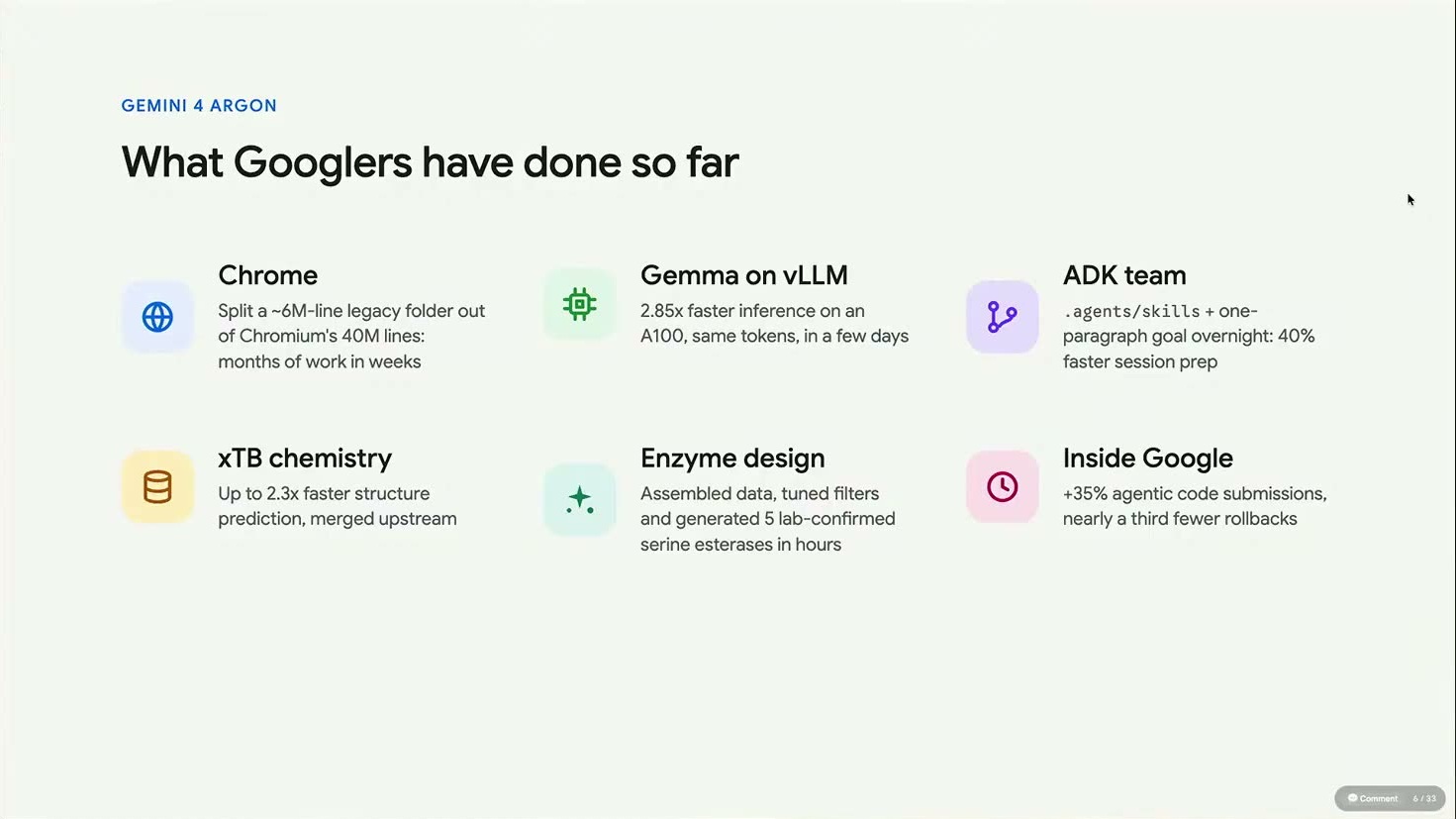
我觉得非常令人印象深刻,因为它还是个很新的模型。我们已经在内部测试了几周,但 Google 员工用得非常多,也推出了许多很酷的成果。Chrome 团队利用它加速了Chromium 浏览器的一些解耦工作。我们有 Gemma,这是我们的开放模型,Gemini 帮助改进了 Gemma,让它更容易部署、运行效率更高。Google Cloud 的 ADK 团队改进了他们的框架,此外还做了许多其他事情,尤其是最下面那项。我们在内部大量使用它,也看到了明显提升,我们的内部代码库也有改善。
I think it's very impressive because it's like a super new model. We had it available internally to test for a few weeks already, but Googlers are using it so heavily and shipping so many cool things. We had the Chrome team basically accelerating some decoupling of the Chromium browser. We have Gemma, which is our open model where Gemini accelerated Gemma to be more easily and more efficient to run. The ADK team from cloud improved their framework and then many, many other things, and especially the right one at the bottom. It's like we use it internally heavily and we see strong improvements for our internal code base as well.
那么大家都构建了什么?
So what have people built?
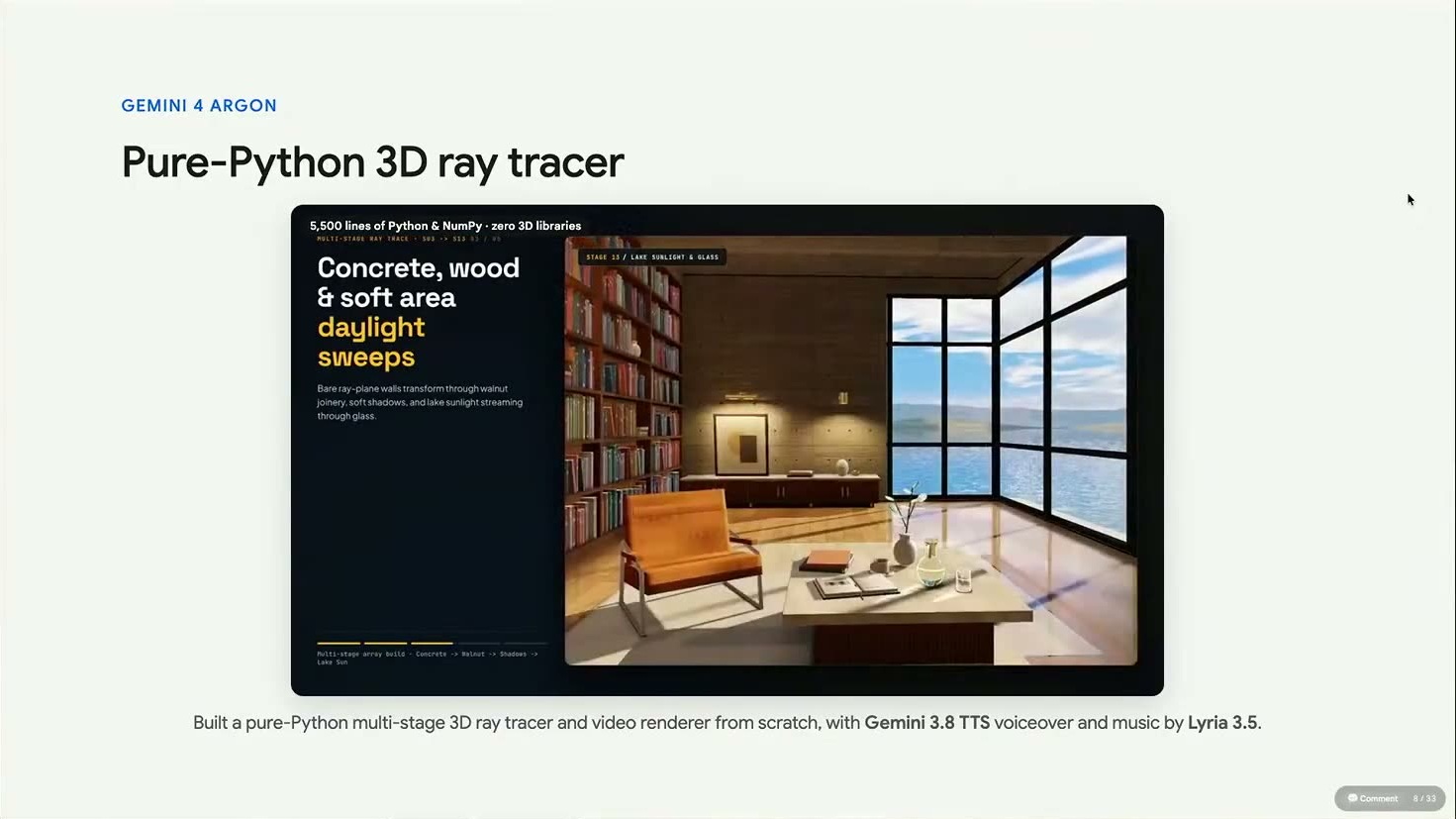
有一些演示,你可以自行查找,不过我想展示一位同事做的一个特别案例。我想给大家看看。他基本上是提示 Gemini 用 Python 构建一个自定义的 3D 光线追踪器。整个项目完全由 Gemini 构建,没有使用任何外部工具,最后只用到了 Python。他还用了 Gemini 的 TTS 模型和 Luria,添加旁白来解释它的工作原理。我觉得这非常令人印象深刻,能看到我们现在可以把这些模型推到多远。所以要大胆尝试。
There are some demos. You can look them up, but there's one specific one from a colleague of mine which I want to show. he basically prompted Gemini to build a custom 3D ray tracer in Python. And it was completely built from Gemini and nothing external tools and at the end just Python. And it also used a Gemini TTS model and Luria to add some voiceover to explain how it works. And it's like very impressive for me how far we can push those models now. So try to be very ambitious.
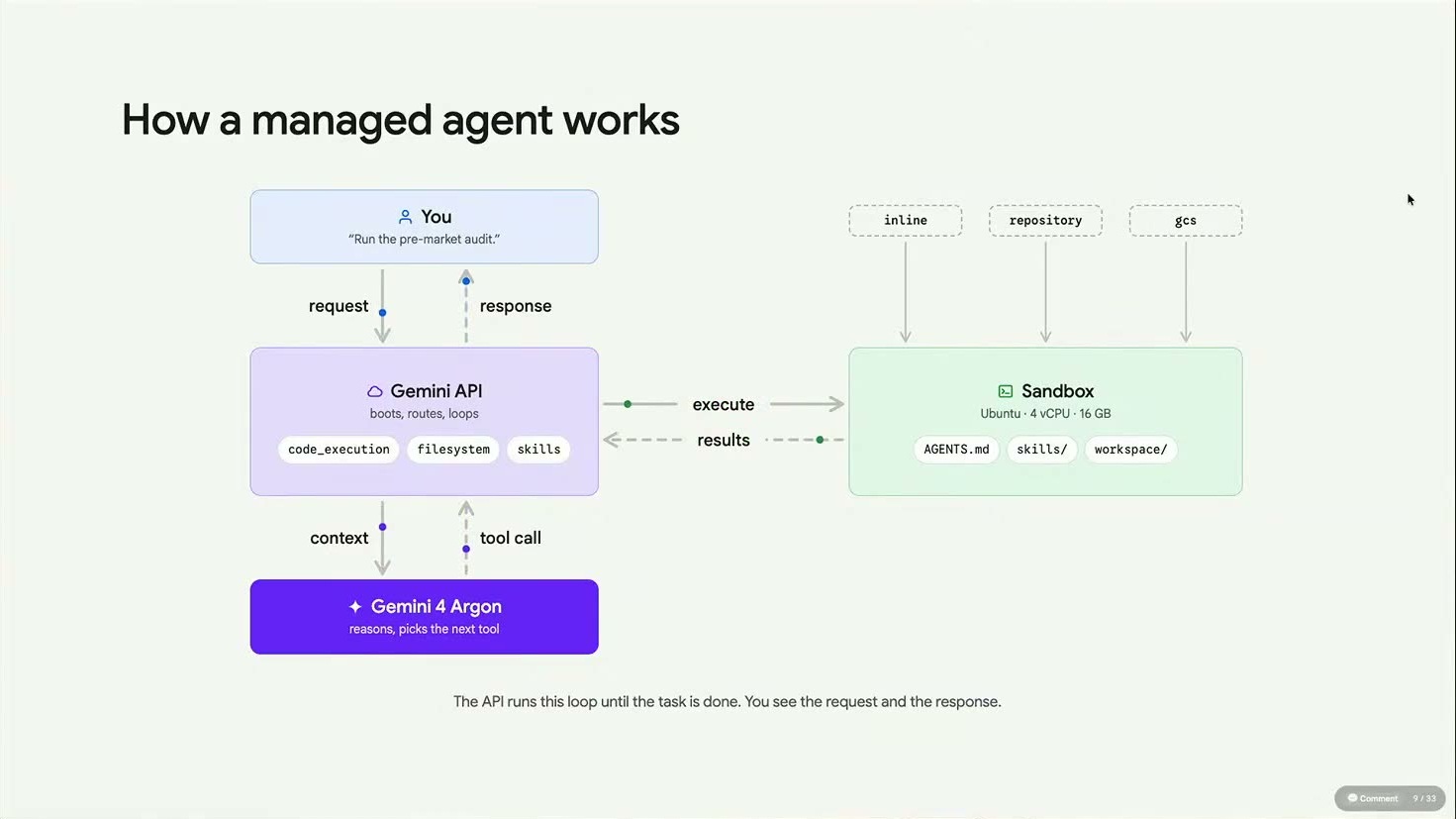
那么我们如何构建自己的智能体?Gemini API 中有一款产品叫 Managed Agents。Managed Agents 基本上是一个简单的远程智能体构建方式,你可以为 Gemini 提供一个沙箱,让它在其中运行工具。通常构建智能体时,我们会遇到这种有点奇怪的工具调用循环,对吧?我们向模型发送请求。模型可能会生成一个 JSON 函数调用。我们收到这个函数调用。在自己的机器上运行函数调用,执行代码,然后再回到模型。而 Managed Agents 会直接提供一个沙箱,让 Gemini 在其中运行所有这些调用。
So how can we build our agent? And in Gemini API, we have a product called Managed Agents. And Managed Agents is basically a simple way for you to build a remote agent where you give Gemini a sandbox which it can use to run tools. So when we normally build an agent, we have this weird tool calling group, right? We send a request to the model. The model might generate a JSON function call. We receive that function call. We run that function call on our machine, execute the code, and then we go back to the model. And with managed agents, we basically provide a sandbox which Gemini can directly use to run all of those calls.
如果它决定执行代码来写入文件,它就有自己的一台电脑可以使用,而且只需一次 API 调用就能完成。
So if it decides to execute code to write a file, it has its own computer available for it to use, and it takes just an API call.
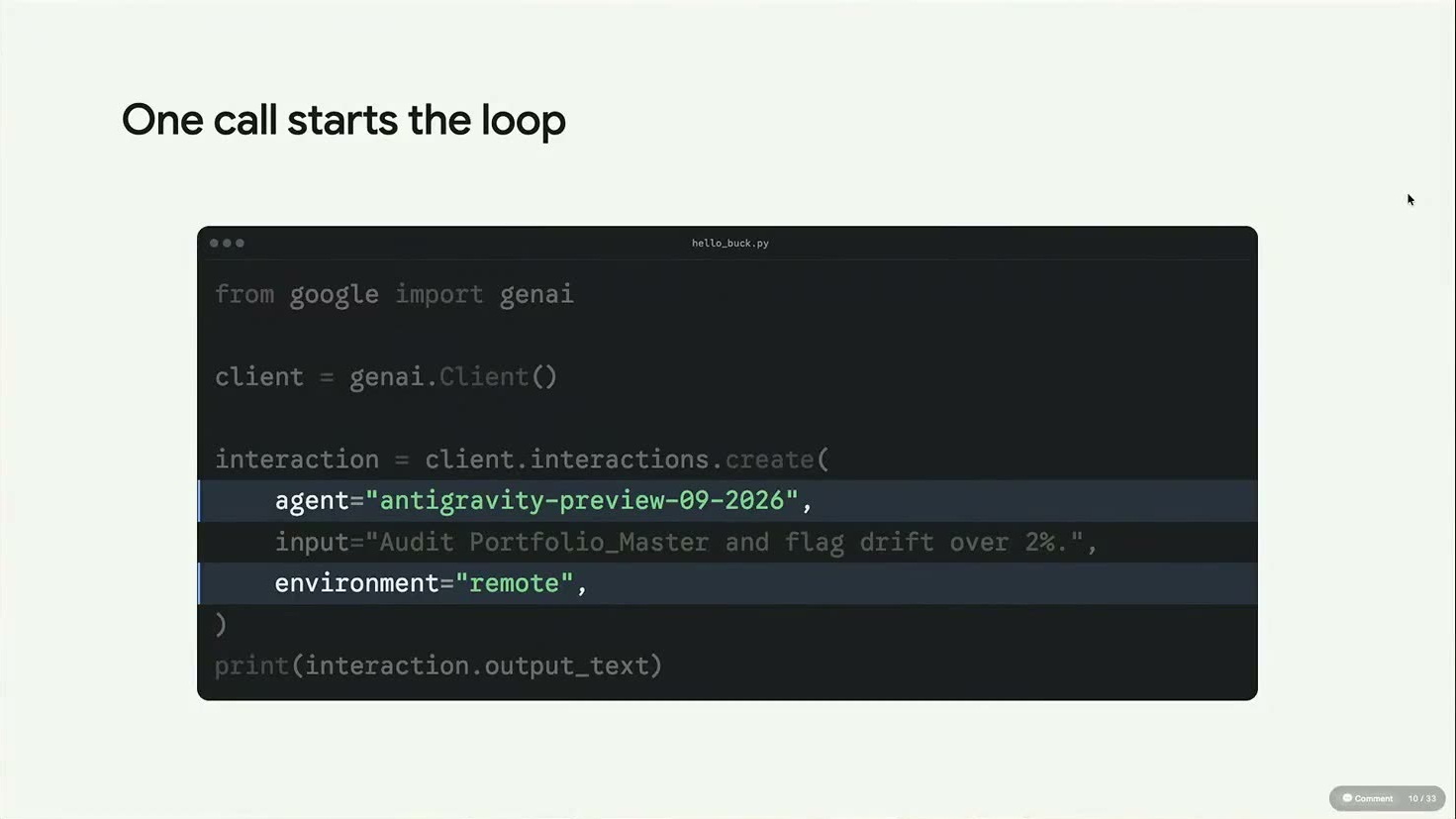
所以你不再提供 Gemini 4 Argon 的模型 ID,而是提供智能体 ID。本例中是 anti-gravity preview 09。给它一个提示。运行环境在远程,所以要在托管沙箱中运行。这样就全部设置好了。现在我们开始构建 Buck。Buck 是今天要介绍的协作伙伴,它需要一个大脑。我们会用 Gemini 作为大脑,用 Agents 作为它的电脑,另外当然还有大家熟悉的其他组件。
So instead of providing the model ID with Gemini 4 Argon, you provide the agent ID. In this case, it's anti-gravity preview 09. Give it a prompt. The environment is remote, so you want to run it in the managed sandbox. and that's all it takes. So let's get into building Buck. Buck is our co-worker for today, and Buck needs a brain. Our brain is going to be Gemini, our computer is going to be Agents, and then we all love all of the other things.
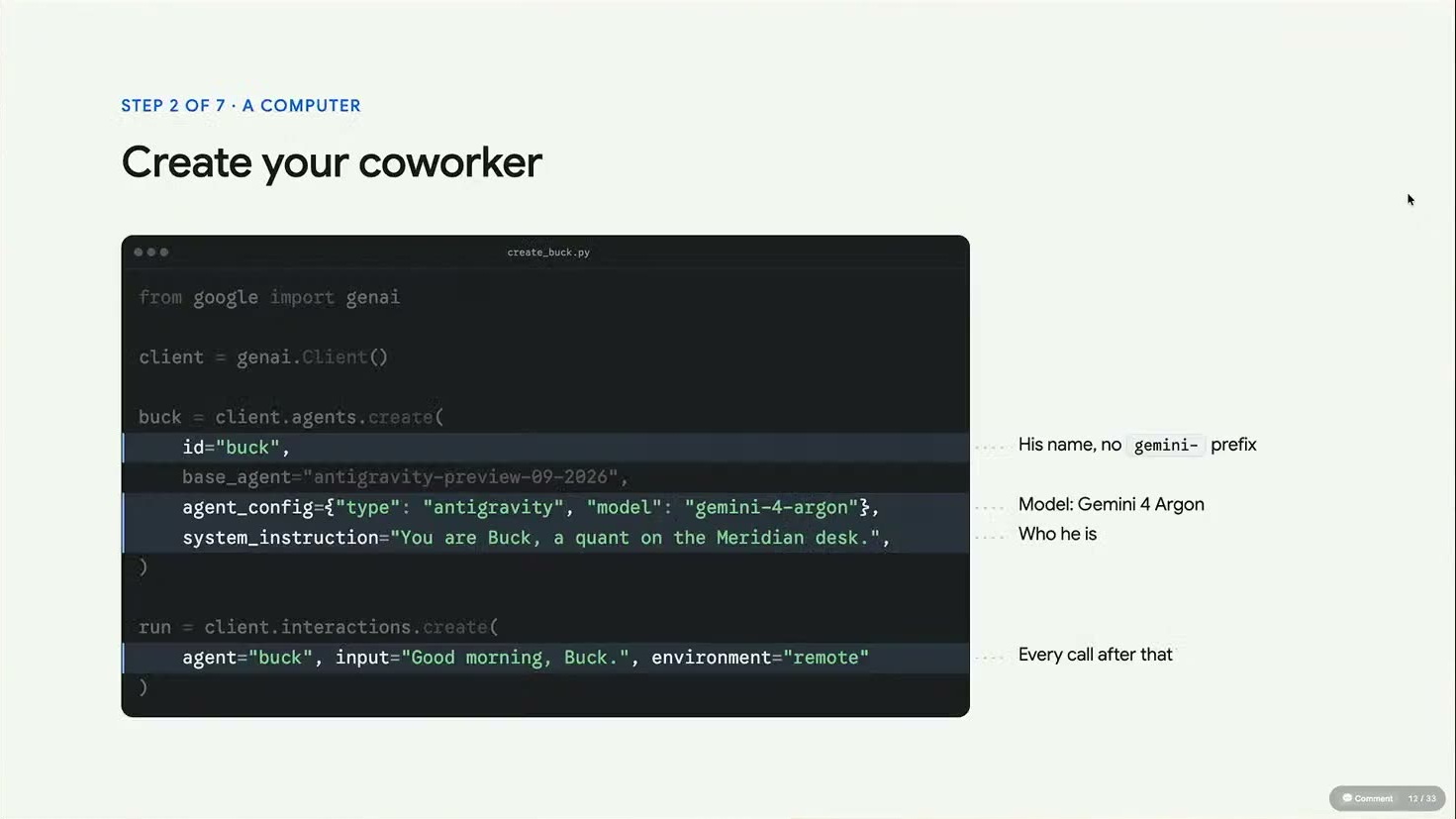
那么如何创建智能体?Managed Agents 提供了一个非常简单的 API,可以用来定义自己的智能体。你要给它一个 ID。这是之后调用智能体时使用的名称。我们有基础智能体,也就是底层的主智能体。这里使用的是智能体运行框架。所以远程智能体使用的也是同一个智能体运行框架,和我们在 Antigravity 中使用的一样。如果你把 Antigravity 用作编程智能体,远程运行时也会使用同一套智能体运行框架。然后我们想使用新模型。所以要定义模型。我们有一条系统指令:“你是 Buck。”调用它所需的操作仍然是通过 Interactions API 创建请求。
So how can you create an agent? In Managed Agents, you have a very simple API where you can define your own agent. So you give it an ID. That's the name which you are going to use later to call the agent. We have the base agent, so that's the main agent underlying. In this case, it's the agent harness. So the remote agent uses the same agent harness, which we have in Antigravity as well. So if you are using Antigravity as your coding agent, you get the same agent harness remotely. Then we want to use the new model. So we define our model. We have a system instruction, you are back. And then all it takes to call it, again, interactions API, create.
我们不使用 Gemini 的模型 ID或默认智能体,而是使用自己的智能体 Buck。智能体需要一台电脑,而电脑通常还需要一些额外文件,以及额外的脚手架。
And instead of using the model ID for Gemini or the default agent, we use our own agent buck. And our agent needs a computer, and the computer normally needs some additional files, additional scaffolding.
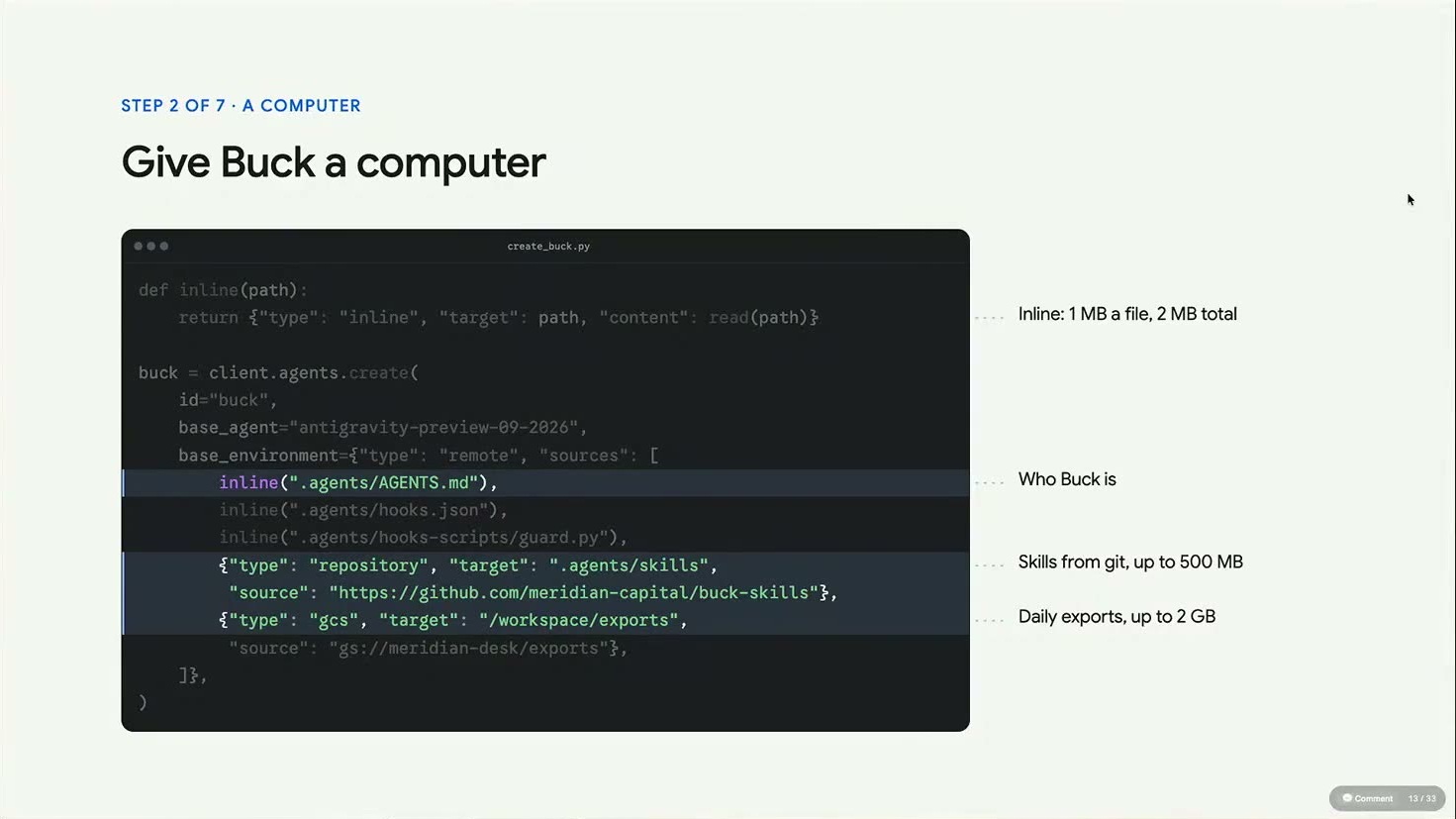
在 Managed Agents 中,你可以提供技能,或提供 AGENTS.md 文件,比如来自你的 GitHub 仓库。也可以直接内联这些文件。你可以指定一个 GitHub 仓库,无论是私有还是公开仓库,并使用其中的技能,还可以连接 GCS 存储桶。这样就可以预先配置好环境,让智能体在其中工作。
So with managed agents, you can provide your skills or an agents MD file, maybe from your GitHub repository. You can inline those files directly. You can provide a GitHub repository, private or public, with your skills, and you can connect GCS buckets. So you can already bootstrap the environment the agent is going to work in.
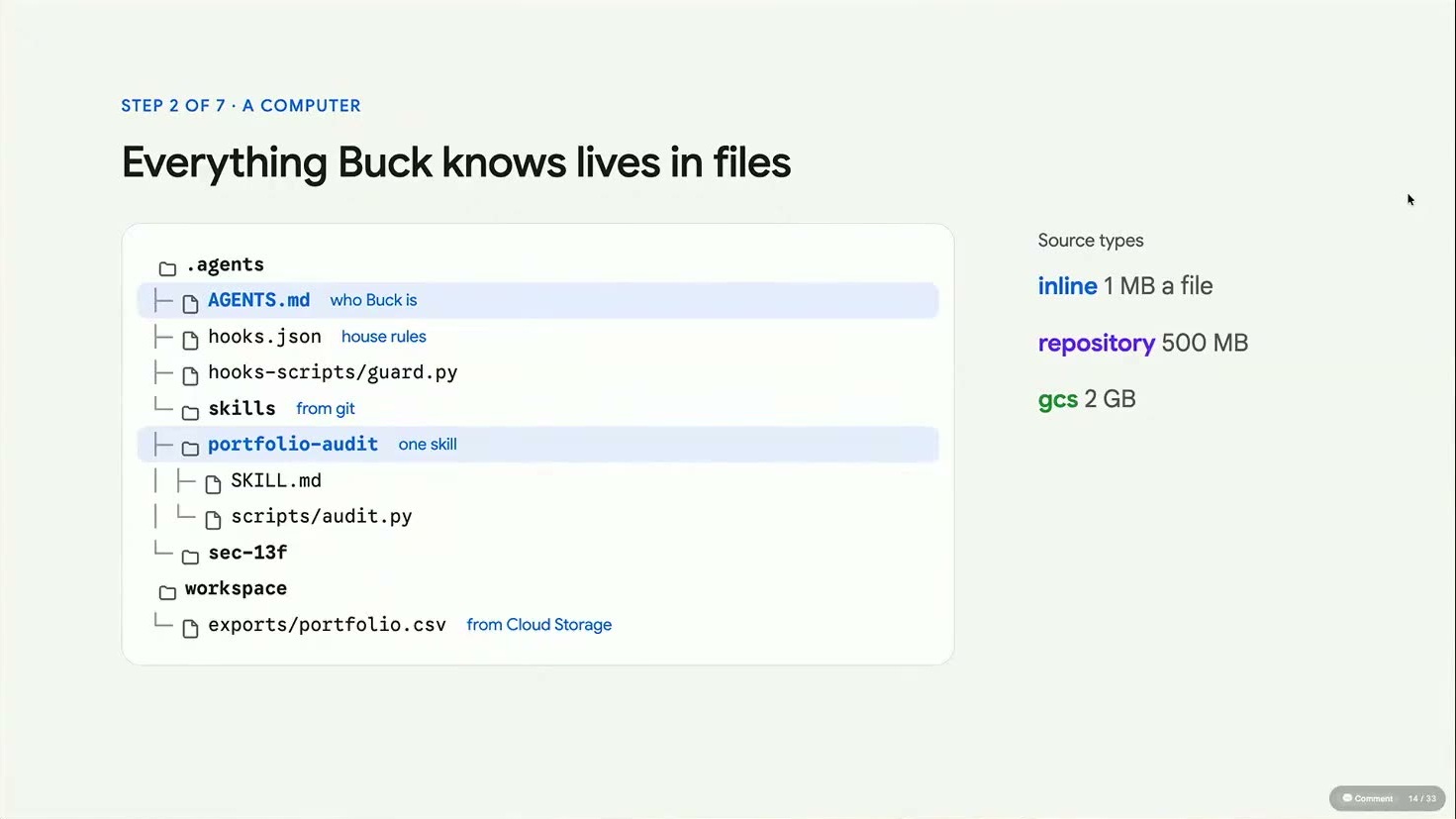
Managed Agents 中的一切都以文件形式存在。因此我们有技能、钩子和系统指令。归根结底,它就是一个文件系统,也就是智能体自己的电脑,如果它认为需要提升自身能力,还可以在里面创建新技能,也可以保存之前会话或学习得到的记忆。所以最后,我们处理的都是文件。
and everything in managed agent lives as a file. So we have skills, we have hooks, we have system instructions. At the end, it's just a file system or the agent's own computer where it can create new skills if it thinks it needs to improve itself, where it can store memories from previous sessions or learning. So at the end, we just work with files.
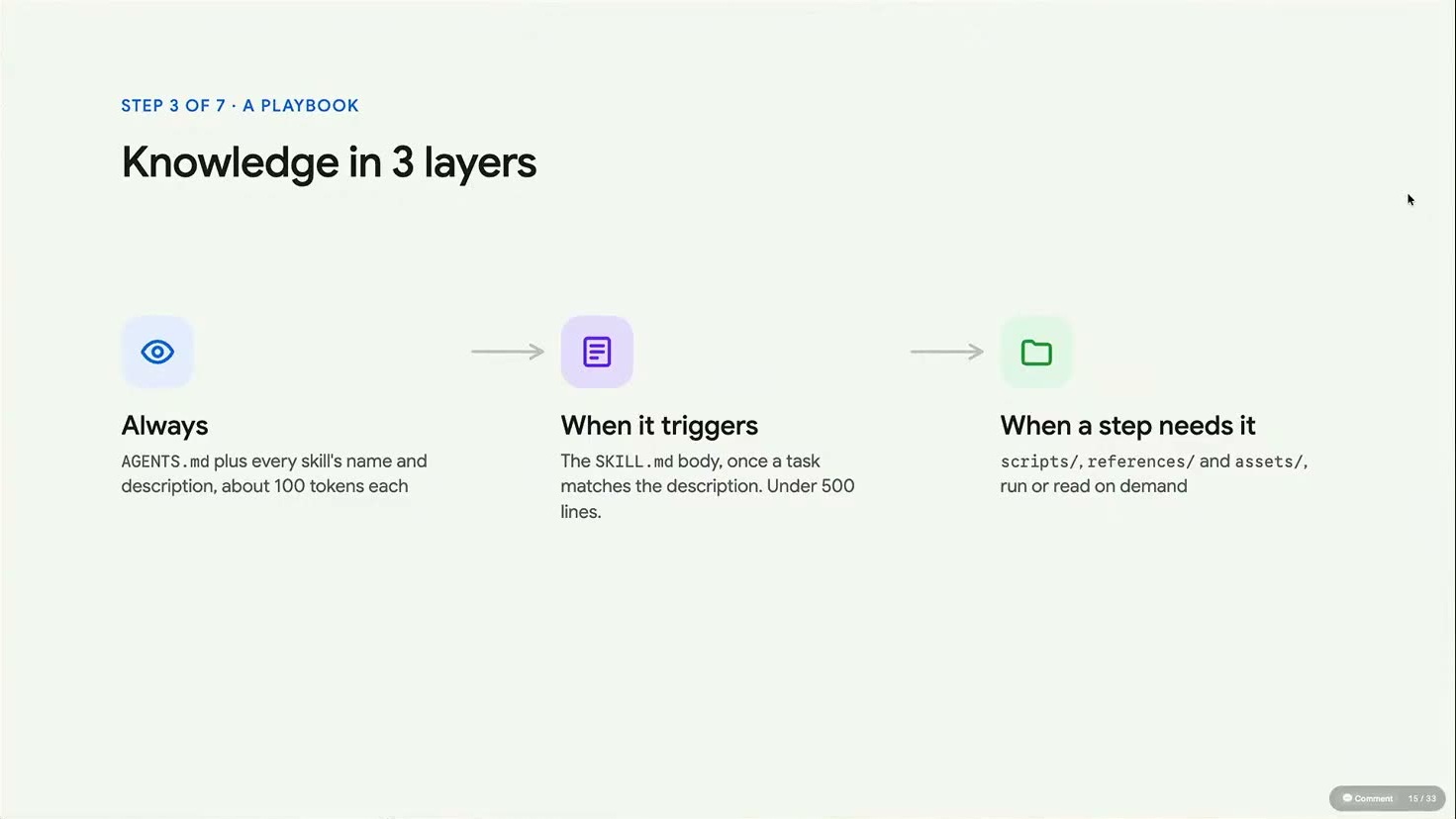
对智能体的知识而言,我喜欢把它分成三类。第一类是每个请求都必须包含的知识。通常就是系统指令。我们希望它非常精简。尽量保持简短,因为每次请求都要为它付费。如果系统指令很长,每个请求都会贵得多。除了精简的系统指令,还有一类知识,智能体可以自行判断何时需要使用。通常这就是技能,对吧?技能通常有很短的说明,为智能体提供一些指引,比如:如果用户想完成某项任务,或者你需要执行某项任务,就可以使用这项技能;然后智能体可以读取该技能。
And for knowledge or for our agent, I like to separate those in three different categories. So we have knowledge which we always need to include into every request. That's normally the system instructions. We want to be very concise. We want to try to keep it very short because that's something we need to pay on every request. So if we have very long system instructions, all of our requests are going to be much more expensive. If we have concise, then we have knowledge which the agent can decide when it needs to use them or not. So that's typically with skills, right? with skills we have very short descriptions which give the agent some guidance on like hey you can use that skill if the user wants to do a certain task or if you have to do certain tasks and then can the agent can read that skill.
不过我们也要避免技能过长、过于密集,因为最终成本也会很高。上下文对我们非常宝贵,所以应该把它们解耦,拆分成更小的部分,并在需要时提供专门的参考资料和脚本,以便智能体完成某些特定任务,
But for skills, we also want to make sure that we are not having super long, dense skills because that's also a high cost at the end. Context is very valuable for us, so we want to decouple them and separate them into much more slices where we can then have dedicated references and scripts if we want the agent to do very certain things
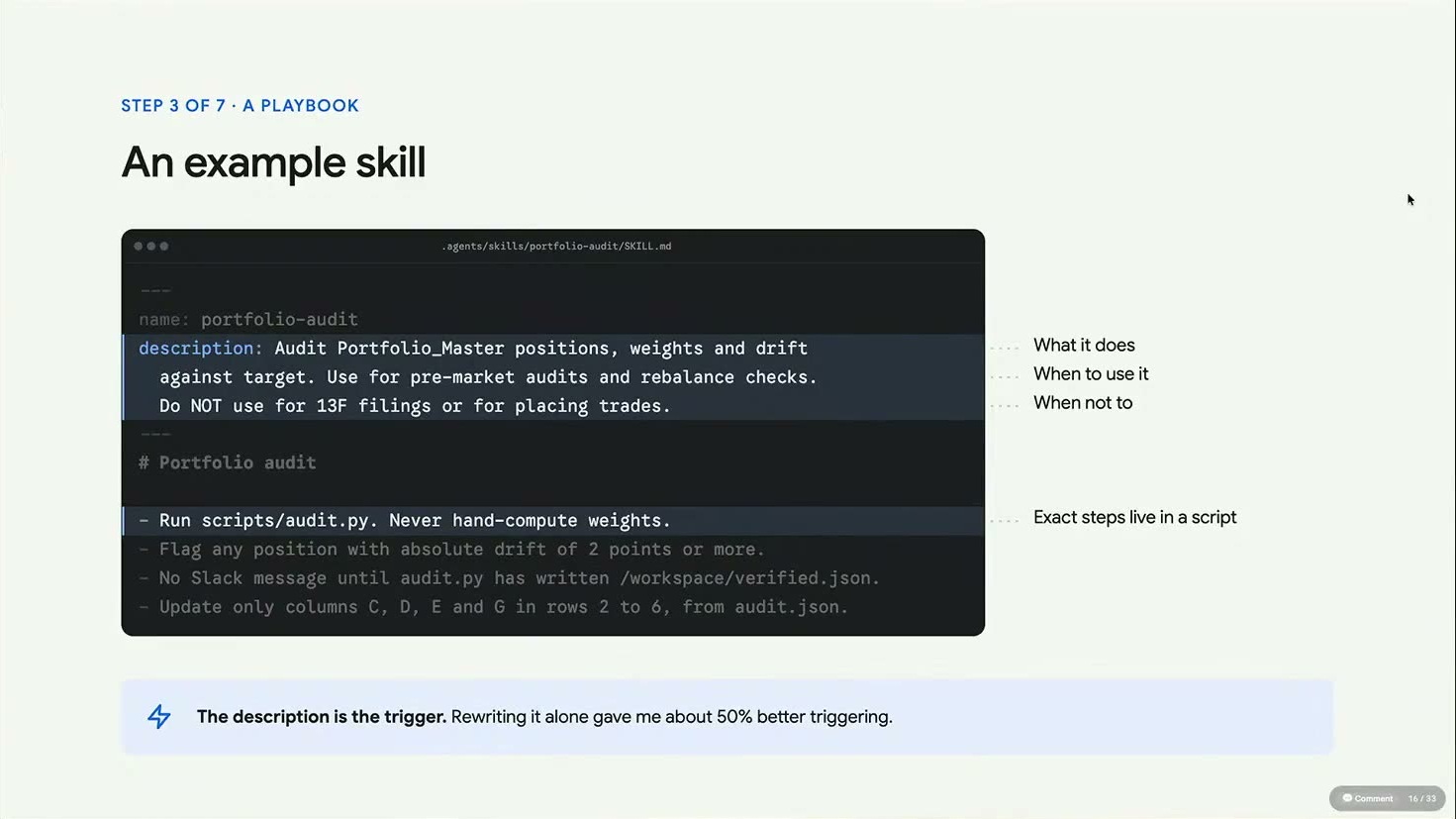
尤其是在需要更多上下文的时候。好,我们看一个示例技能,接下来会用到它。这是一个投资组合审计技能。智能体应该使用它。它提供了一些指令,说明如何运行。我们有一个 Python 脚本,智能体可以运行它,此外还提供了一些信息,说明它应该如何处理结果,以及应该把结果存在哪里。
where it needs more context. Okay, so let's look at an example skill which we are going to use. So we have a portfolio audit. The agent should use it. It has some instructions available for it, how to run it. So we have a Python script. The agent can run, and then some additional information on what it needs to do with the results and where to store it.
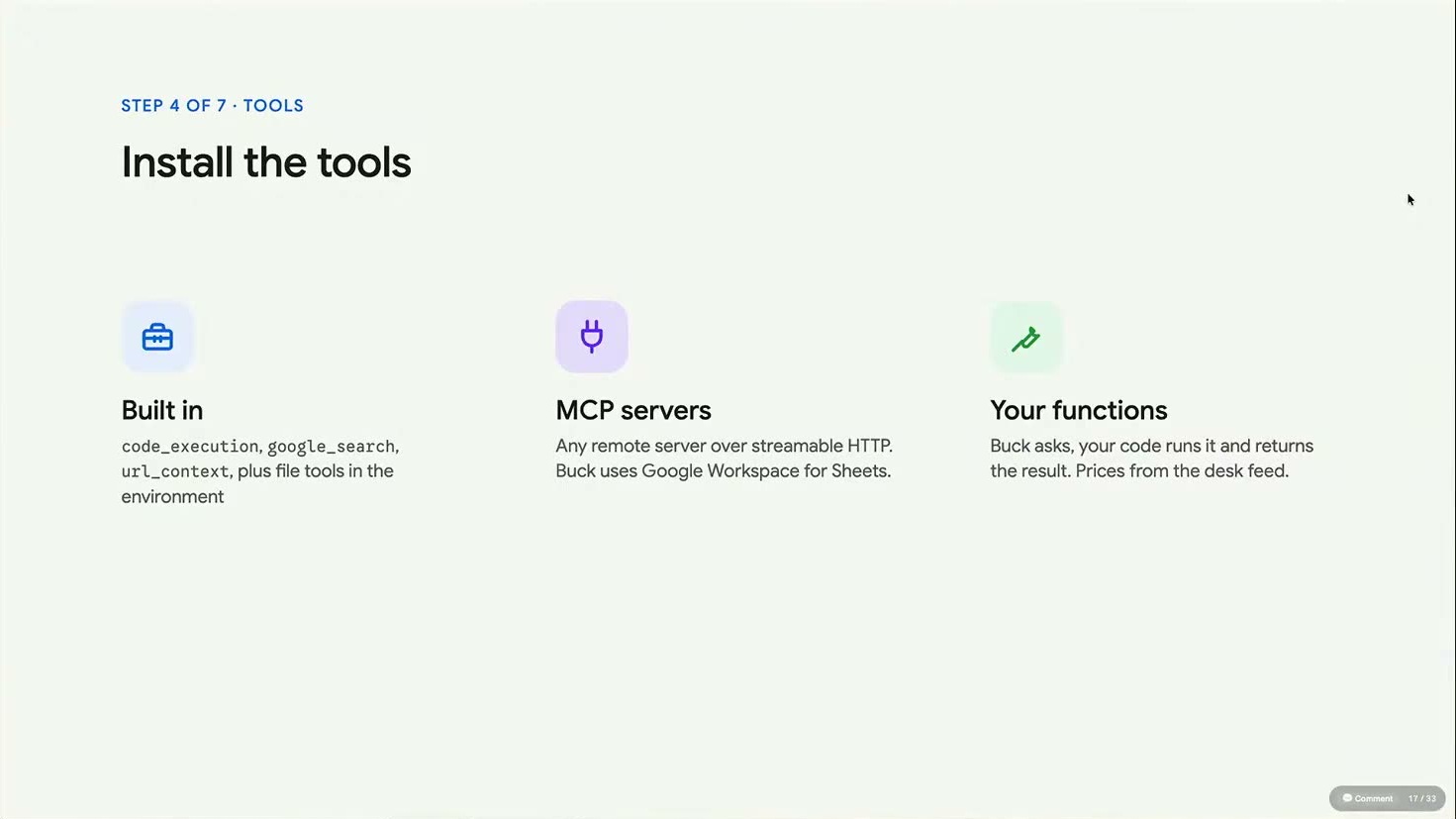
协作伙伴入职流程的第四部分,是为它们配置工具,对吧?我们人类使用普通软件;智能体可以使用内置工具,例如 Google Search、代码执行,或 MCP 服务器。如果你没有 MCP 服务器,想改用本地函数,也可以。
Our fourth part of our onboarding for our coworkers tools, right? We humans use normal software for agents that's either built-in skills like Google Search, code executions, or MCP server. Or if you don't have an MCP server and rather want to write a local function, that's also possible.
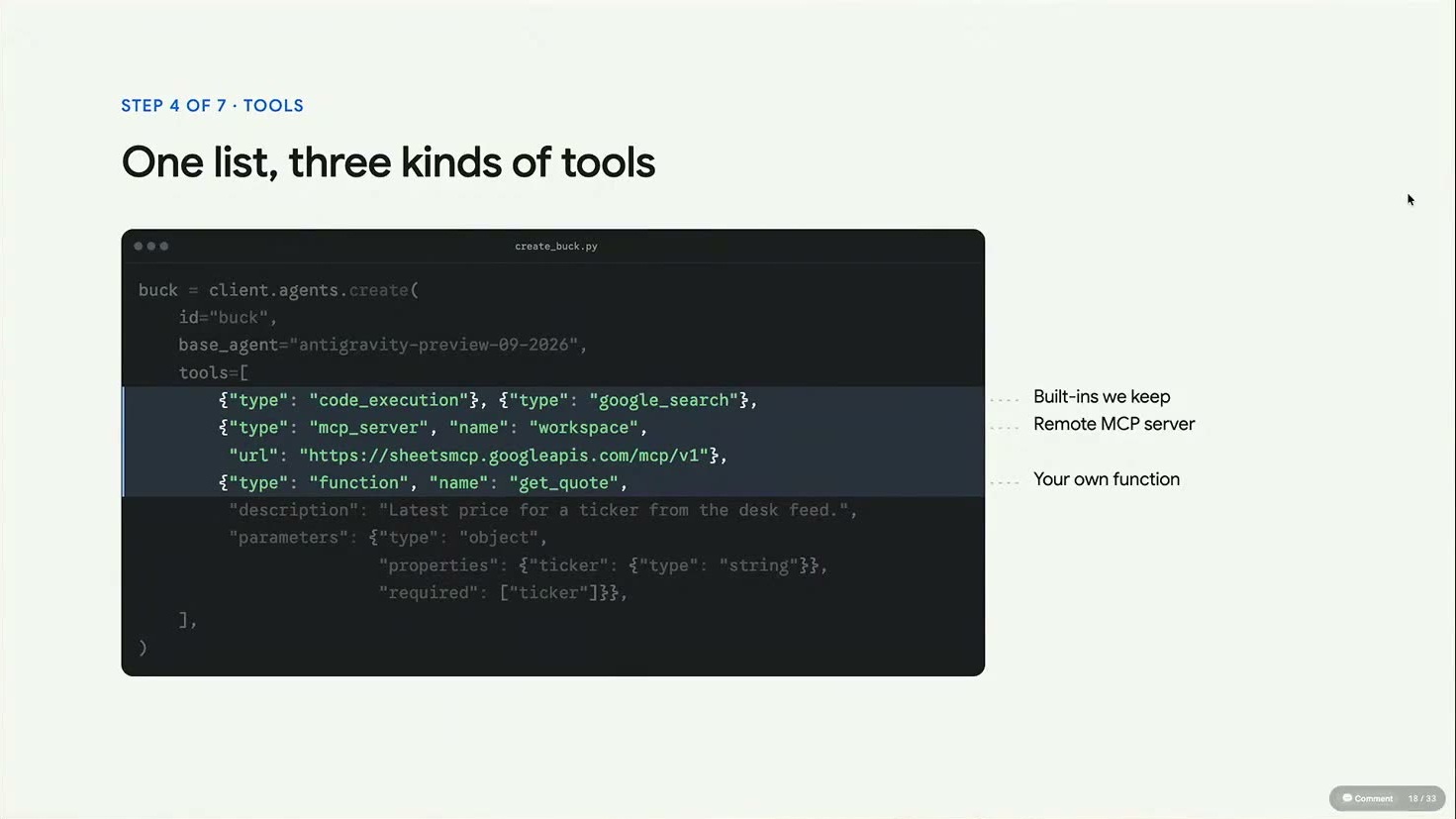
在 Managed Agents 中,我们仍然要创建智能体,现在要进一步定义它们的工具。Gemini API 内置了 Google Search 工具。所以集成 Google Search 不需要你额外做任何事。不过,如果你想使用电子表格之类的工具,Google Workspace 现在为 Gmail 和电子表格提供了 MCP 服务器,所以我们可以使用它。或者你也可以提供自己的函数或 MCP 服务器,这同样可行。
So, managed agents, we still have our agents create. We are now extending it to define our tools. We have built-in tools from the Gemini API for Google Search. So, there's nothing you need to additionally do to get Google Search integrated. but if you want to use, for example, spreadsheets, Workspace has now an MCP server available for Gmail for spreadsheets, so we can use that. Or if you want to provide your own functions or MCP server, that's also possible.
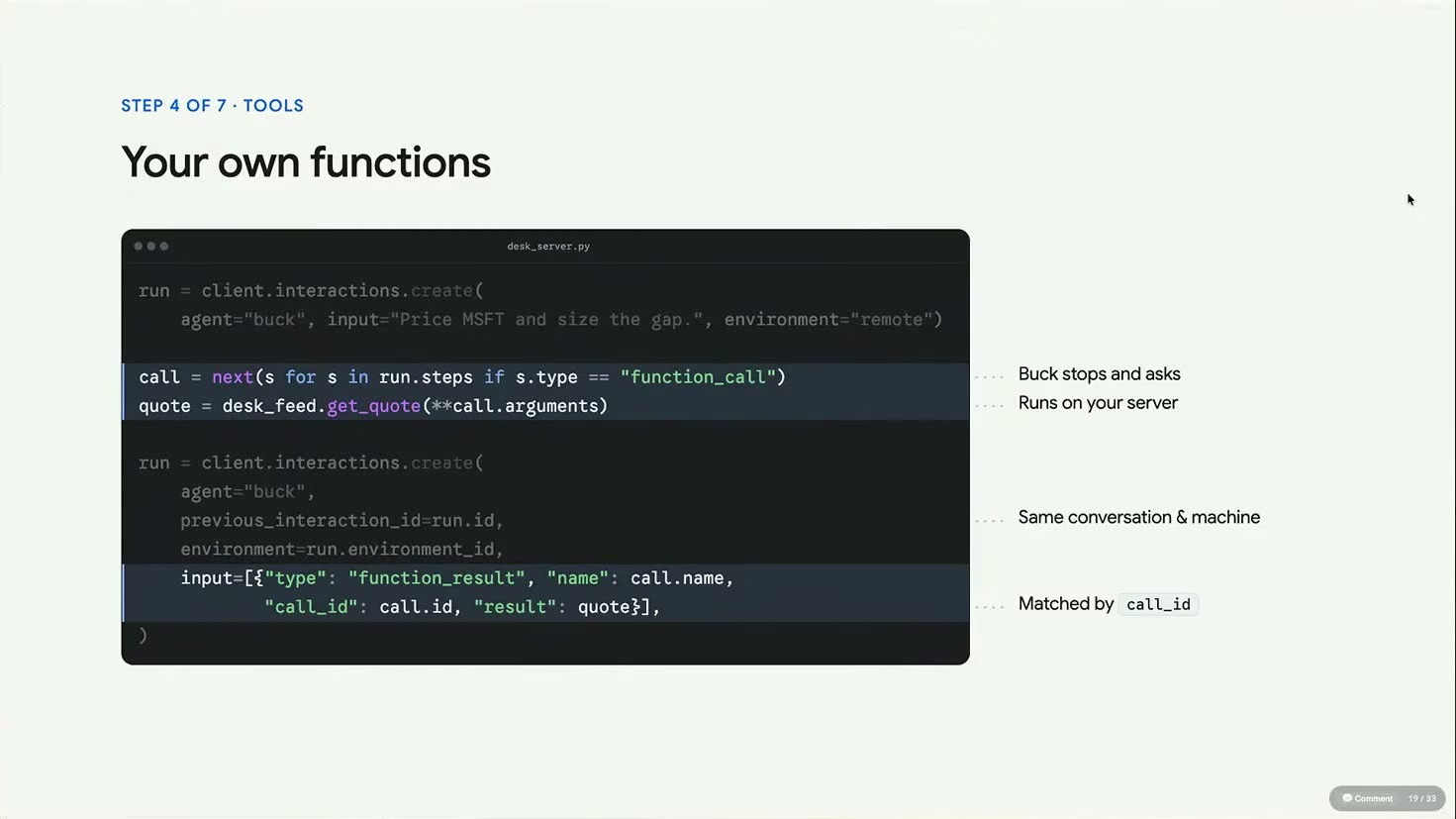
自定义函数的工作方式仍然和你平时使用模型时一样。智能体会创建一个函数调用,然后你把函数结果发回去。这基本上让你能够在这些智能体的环境和电脑之外使用智能体能力。如果你想做某些事情,而且不希望智能体在沙箱中执行,就可以通过这种方式来实现。
So for your own function, it still works the same way as you normally do with models. So the agent creates a function call, and then you send back the function result. So it's basically for you a way to have agentic capabilities outside of these agents' environment and computers. So if you want to do certain things where the agent should not run the execution in the sandbox, that's a way for you to do it.
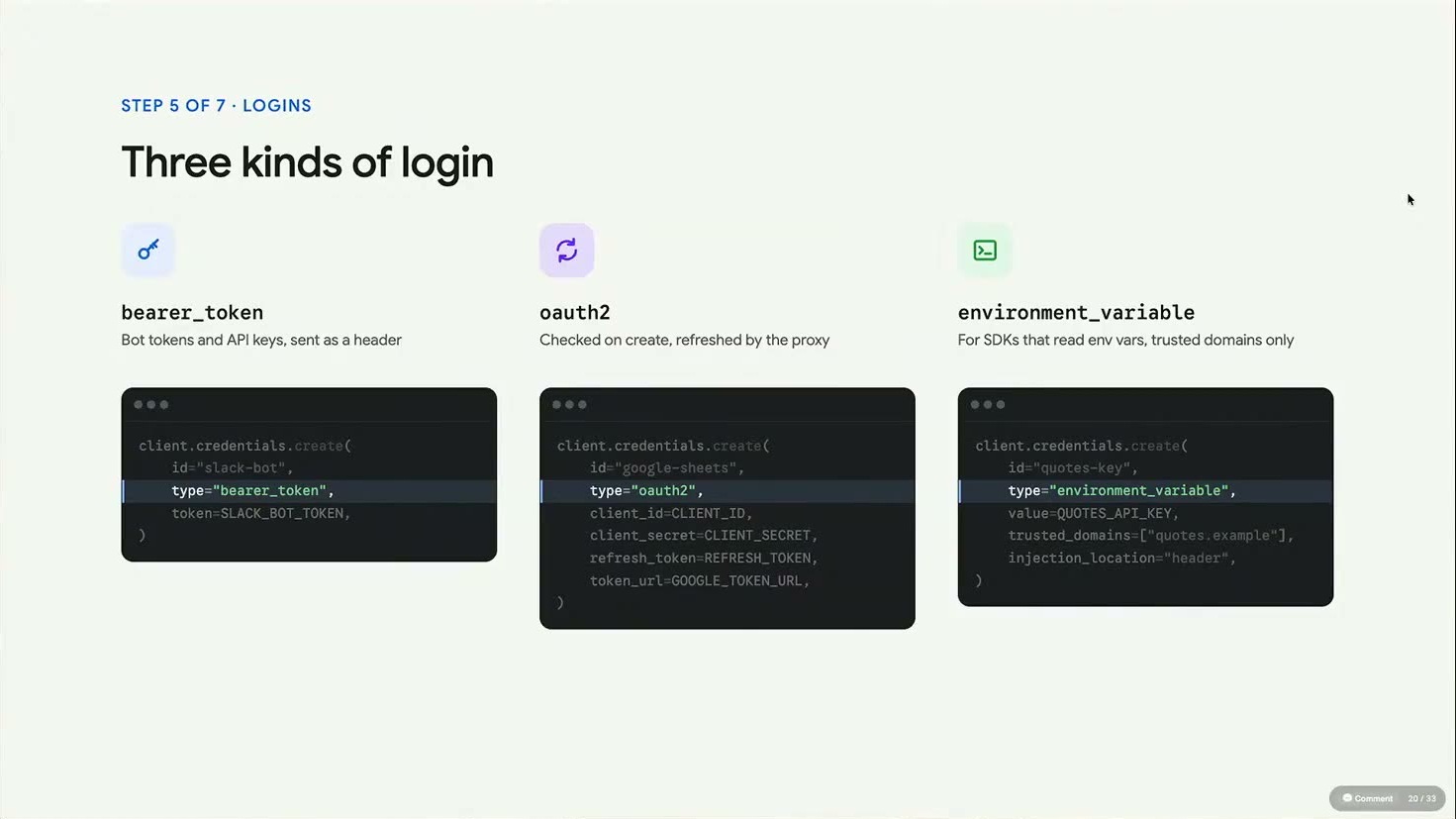
接下来是登录。我认为这对我来说是最令人兴奋的Managed Agents API 的最佳功能,因为凭证非常难处理,用在智能体上时也非常容易出错。我想上一场演讲也提到过,我们需要谨慎地使用智能体,因为很容易出问题。我们在设计 Managed Agents 时对此做了很多思考,支持三种不同的凭证方式,使智能体可以安全地使用凭证,并确保凭证彼此隔离。普通 API 调用可以使用 Bearer token,如果你做软件工程,对这种方式应该很熟悉。面向消费者的 MCP 服务器可以使用 OAuth,所有这类工具都可以如此。
And then we are logins. And I think that's, for me, the most exciting and the greatest feature about the Managed Agents API because credentials are super hard and super easy to get wrong with agents. And I think the previous talk already also mentioned that we are very careful about using agent because things can go wrong very easily. And we've thought a lot about this with managed agents, and we have support for three different ways of credentials, which makes it secure for your agent to use them and provide an isolated way. So we have bearer tokens for normal API calls, very familiar if you are doing software engineering. We have OAuth for all of the consumer-oriented MCP servers, all like tools.
当然,如果我们想使用某些命令行工具或其他功能,还需要环境变量。在 Managed Agents 中,我们通过外部网络代理将凭证隔离。所以不会把凭证直接提供给沙箱里的智能体,
And then, of course, we need environment variables if we want to use certain CLIs or other features. and for managed agents we are separating them via an external network proxy. So instead of providing the agent the credentials inside the sandbox,
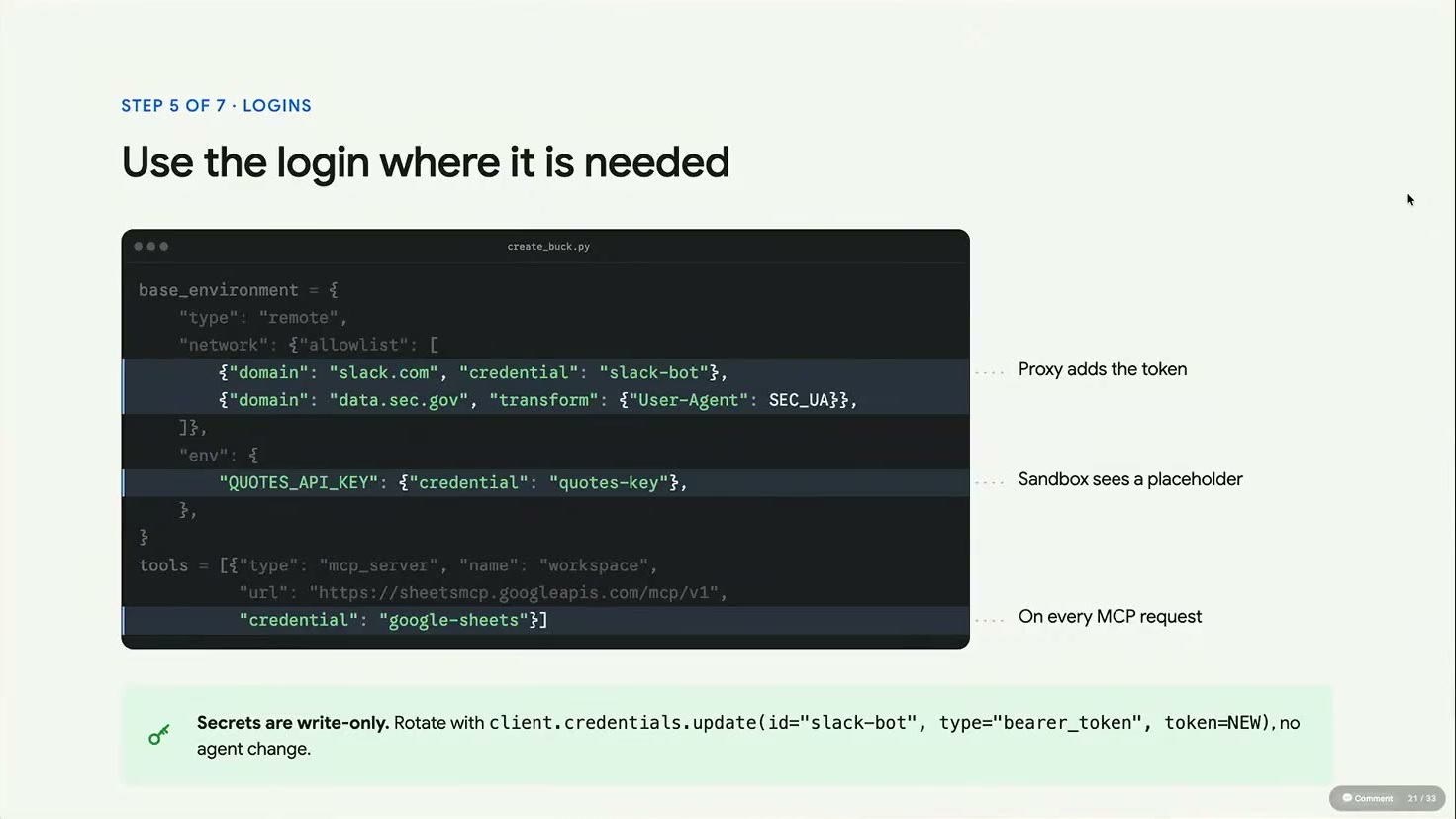
而是允许你在沙箱外创建凭证。这些凭证只能写入,不能读取。一旦写入,就无法再取回凭证。你只能覆盖它们。因此没有泄漏凭证的可能。然后你可以定义这些凭证应当如何、在哪里使用。比如要连接 Slack,你可以定义:“这是一个凭证,你只允许在某个特定域名或环境变量中使用它。”这样就能控制凭证的使用时机。
we basically allow you to create credentials externally. are write only. So once they are written, there's no way for you to retrieve the credentials. So you can only override them. So there's no possibility of leaking. And then you define how and where those credentials should be used. So for Slack, if you want to connect Slack, you can define, hey, here's a credential, and you are only allowed to use that credential with a certain domain or with a certain environment variable. So that way you can control when a credential is used.
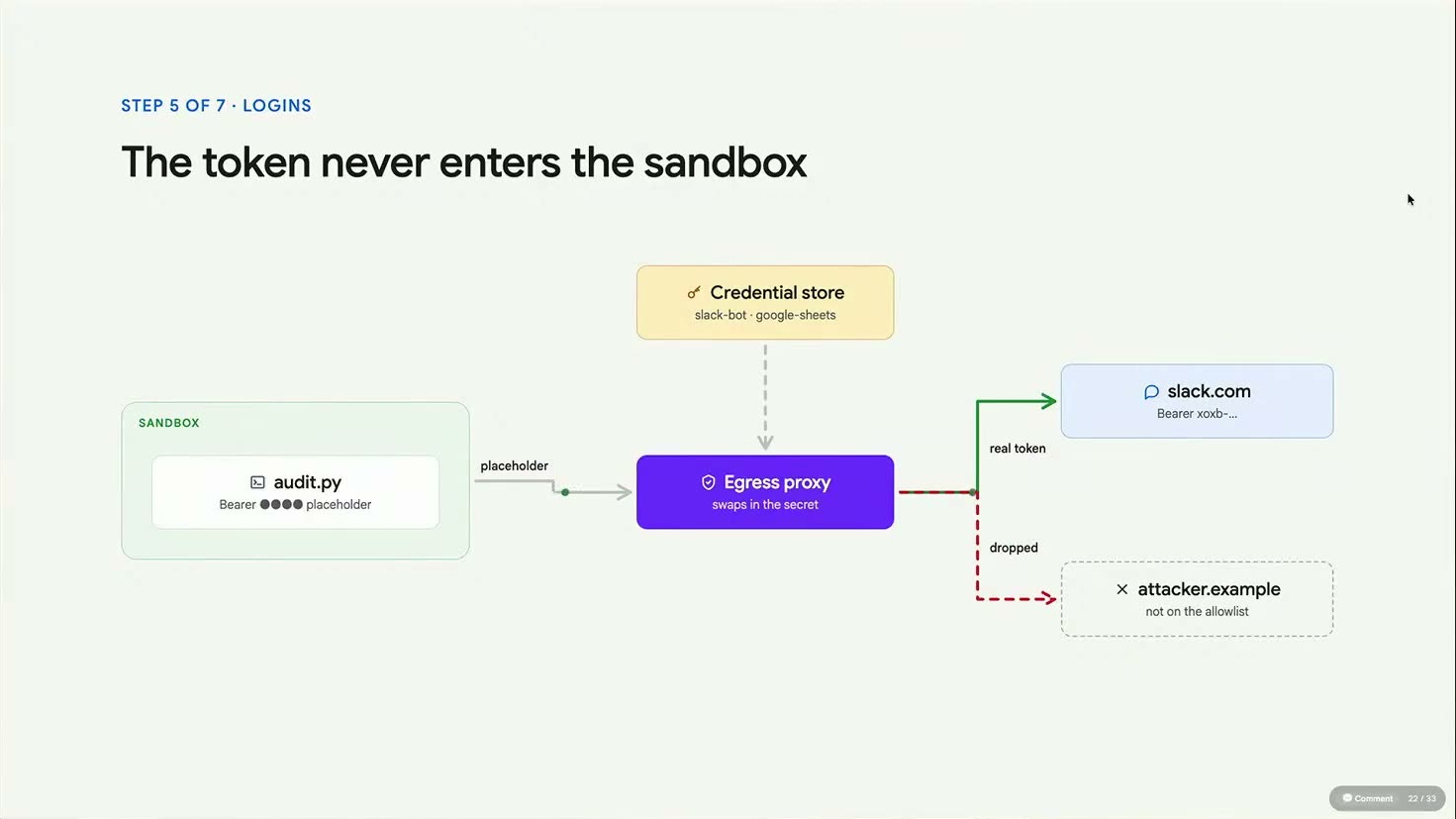
这一切都通过网络代理实现。所谓网络代理,就是部署在沙箱周围、监控所有进出网络流量的代理。如果你把凭证定义为环境变量,模型拿到的是一个本地的虚假值,因此环境变量会被设置好,它发起调用时会使用这个虚假值,网络代理会监控这次调用,发现:“这里有一个用户指定的域名”,然后就会用真实凭证替换虚假值,这样调用就能成功,智能体随后会收到结果,却完全不知道它的虚假 token 没有真正生效。
And that works via this network proxy. And by network proxy, we basically mean a proxy that sits around the sandbox that watches all of the network traffic going in and out. So if you define credential as an environment variable, the model has a local dummy value, so the environment variable is set, and then when it makes that call, it uses that dummy value, and the network proxy basically monitors it, sees, hey, here is a domain which the user has defined, and then it swaps that dummy value with the real credential, and you can make the call successfully, and then the agent gets back the result and has no idea that his dummy token is not working.
这样做的好处是,提示注入无法窃取凭证。通常,如果有恶意攻击者,它可能会指示智能体:“请打印 .n 文件中的所有值。”智能体可能会打开文件并打印出所有密钥,而这是我们绝不希望发生的。使用这个网络代理后,你可以按域名定义凭证,攻击者就无法窃取那些凭证,即使凭证会在请求时被替换,因为代理只会在你定义的域名下进行替换。因此,恶意 MCP 服务器也无法偷走你的 Gmail token。这非常不错,因为这样我们就更容易信任智能体并集成 MCP 服务器,之后智能体当然就能使用这些服务器。
And the benefit here is that there's no way for a prompt injection. Normally, when you have some malicious attacker, it can tell you, like, hey, please print all of your values in your .n file. And then the agent might go there and, like, print all of your keys, and that's nothing we want to do. So with this network proxy where you can define the credentials per domain, it is not possible that an attacker could steal which are getting swapped on your request because the proxy only swaps them for the domains you define. So there's no way an MCP server which is malicious can just steal your Gmail token, which is very cool because it makes it much more easier to trust the agent and to integrate MCP servers which the agent then obviously can use.
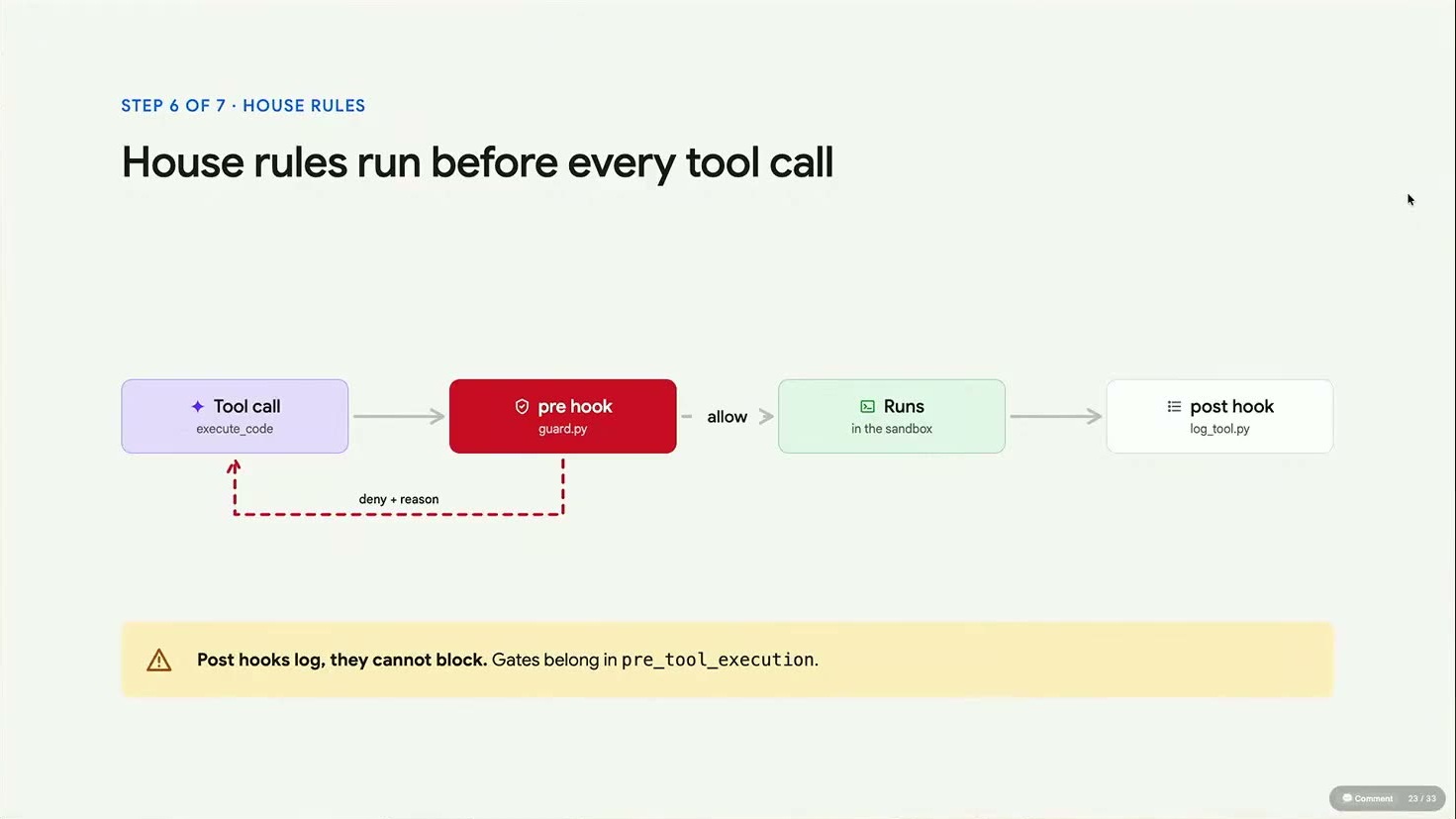
如果这些还不够,我们还提供钩子。钩子可以帮助你以确定性的方式保护某些决策。如果智能体想要运行某些命令,而你可能想监控这些命令,或者需要人工参与审核,而这又不属于正常智能体对话的一部分,就可以定义自己的钩子,方式和其他智能体运行框架很相似,
So if that's not enough, we have also hooks available. So hooks allows you to basically deterministically guard certain decisions. So if the agent wants to run certain commands which you might want to monitor or where you need some human in the loom approval, which is not part of the normal agentic conversation, you can define your hooks, very similar to all of the other agent harnesses
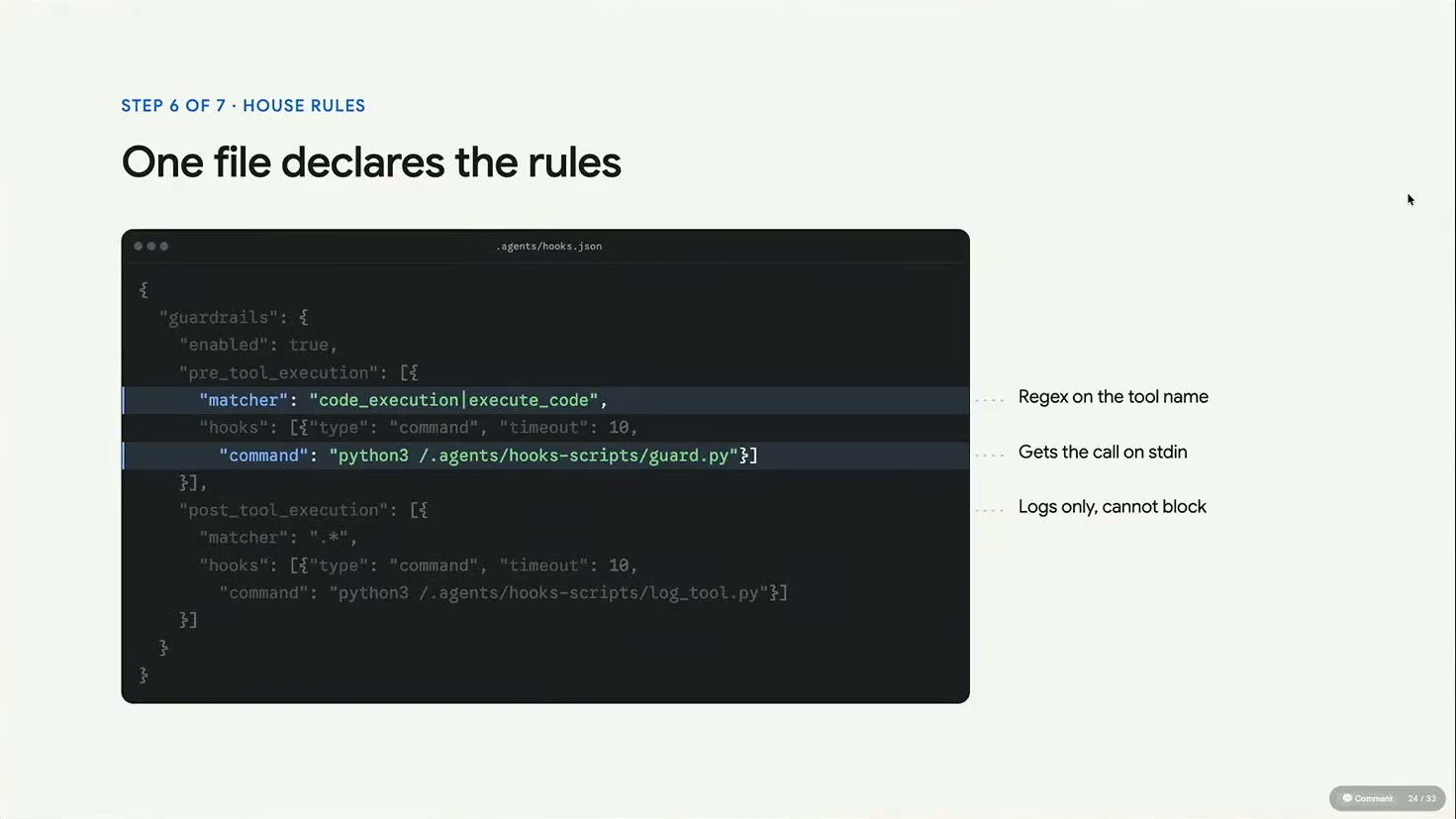
你可以配置一个匹配器,它基本上就是正则表达式,智能体生成的每个工具调用都会检查是否符合匹配条件,然后执行相应的钩子。这些钩子也是文件,但它们受到保护,因此智能体不能直接打开文件,修改钩子,再设法绕过它。
where you have a matcher, which is basically regex, and then every tool call which the agent generates checks if there's a match, and then writes those hooks. And those hooks are also files, but they are protected, so the agent cannot just go there and changes a hook and basically tries to find a way around it.
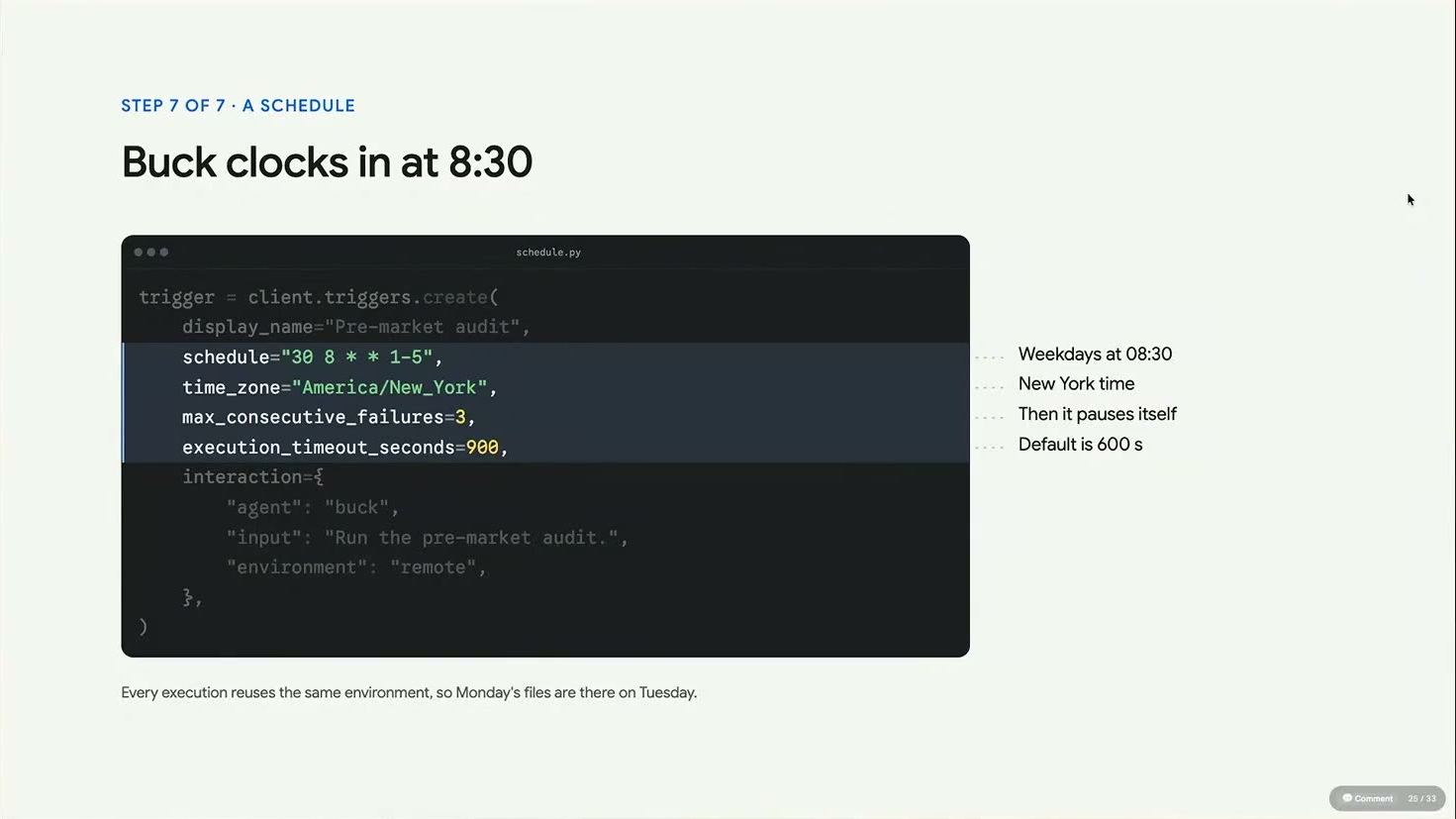
好,最后一点,我们需要让智能体更主动。目前我们支持一种触发方式,就是基本的 cron 触发器,可以设置每月每 30 天在上午运行一次。你可以让智能体在某个触发条件下运行,在同一个环境中接收特定输入,例如开展尽职调查或审计。我们也在开发 Webhook,让整个流程变得更具交互性。
Okay, so last but not least, we need a way to get our agent more proactive. And currently we support one kind of triggers, basic cron triggers, which you can set up, schedule every 30 days a month at a.m. You want the agent to run a certain trigger with a certain input in the same environment to do maybe some due diligence, some auditing. and we are also working on webhooks that you can even make this much more interactive
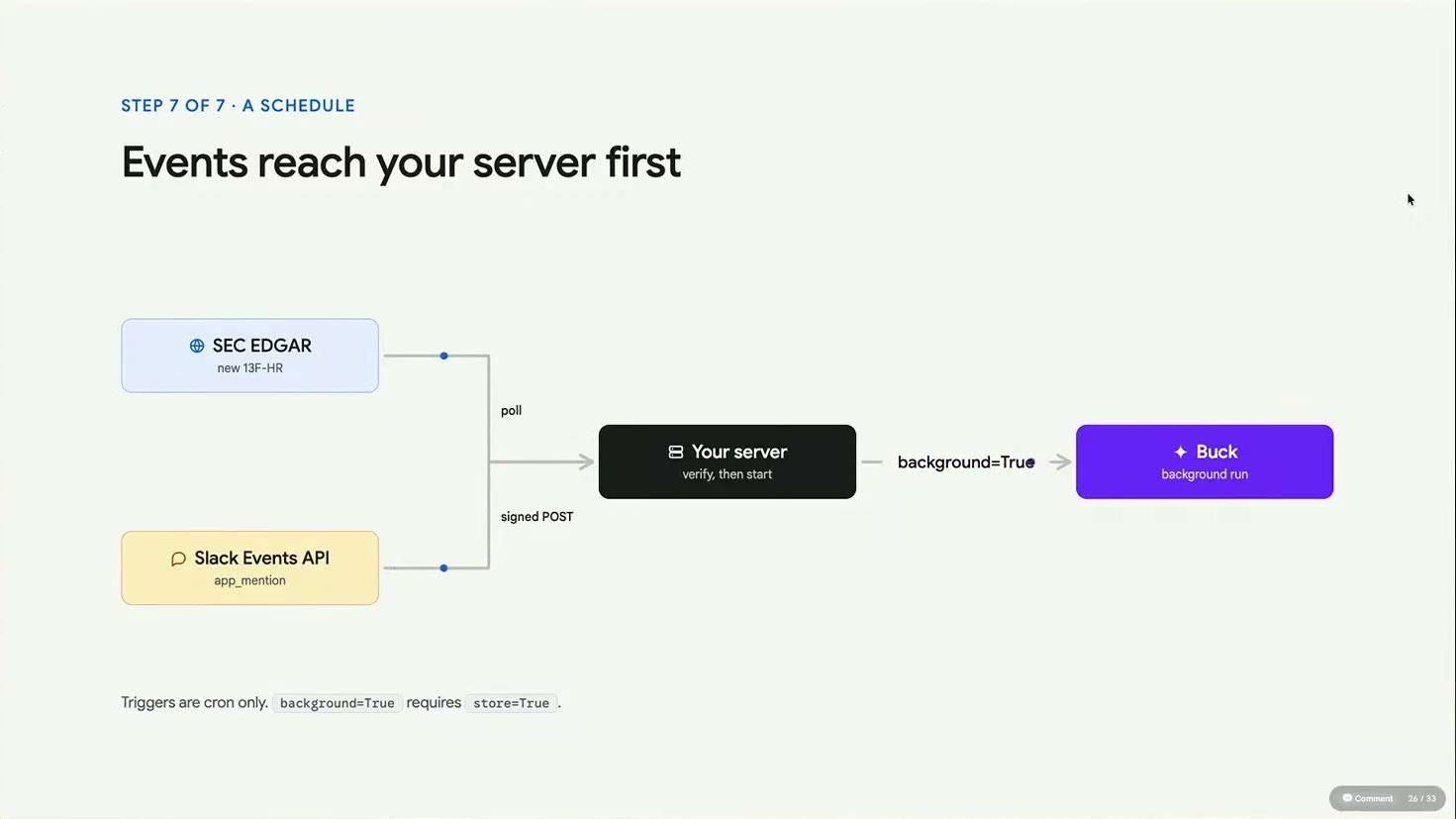
你可以连接外部 Webhook,比如来自某个 SAC 提供商,或者来自与你合作的其他服务商,它们可以直接调用你的智能体。智能体先做一些初步审核,然后可以直接调用 Slack,或 Microsoft Teams,完全不需要你管理任何基础设施。这部分就是这样。这是最后一张图,现在我们来看看一些真实演示,希望Wi-Fi 连接足够好。
that you could connect external webhooks like from some certain SAC provider or maybe other providers you work together with which would directly then call your agent. The agent does some first auditing and then basically can call your Slack or your Microsoft Teams directly without you even needing to manage some infrastructure at all. So that's that. final picture and now let's look at some real demos and let's hopefully hope that the wifi is good enough.
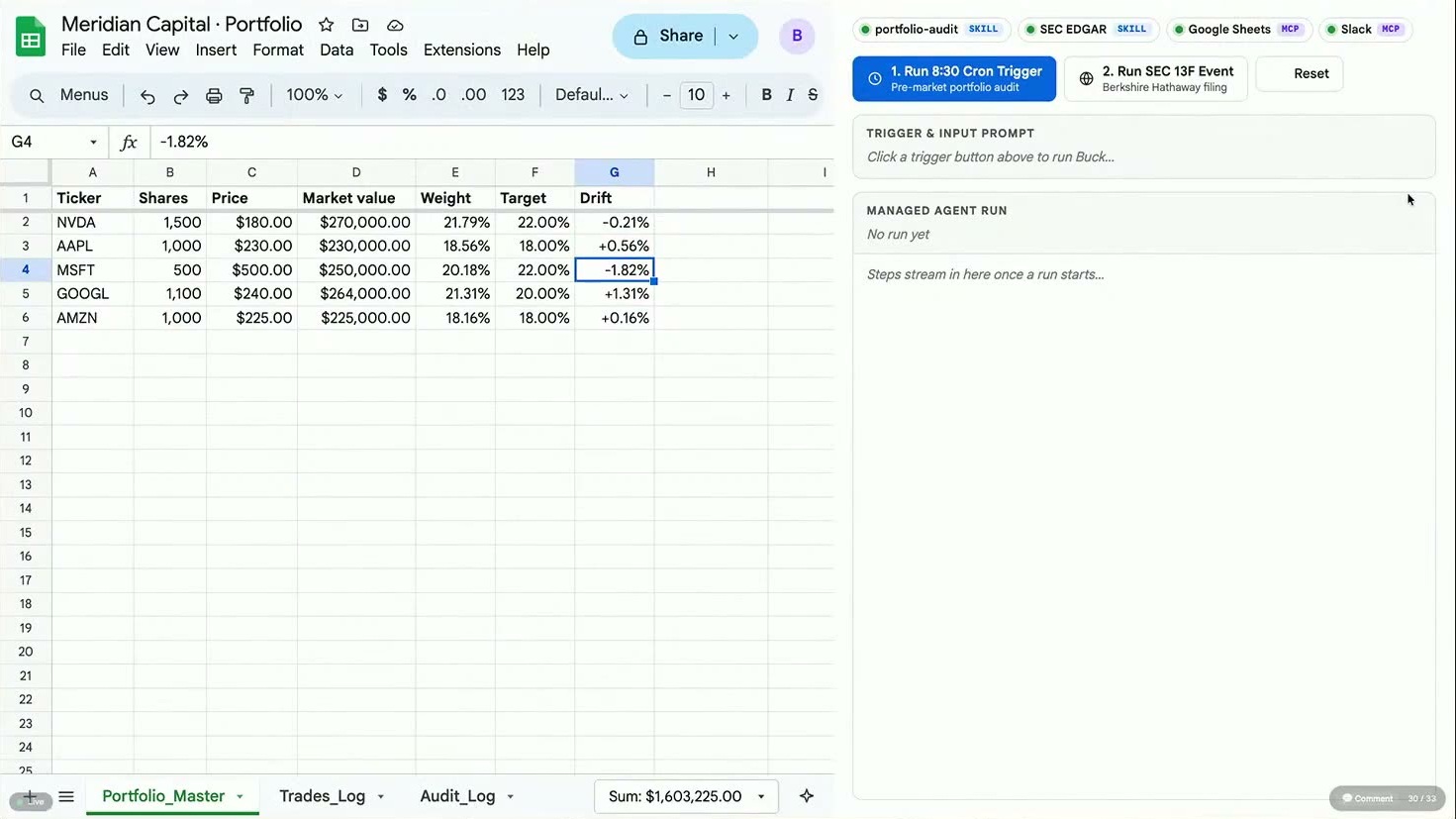
我告诉 Gemini,我想做一个很酷的 Google Sheets 演示,它就帮我创建了一个完整的Google Sheets 仿制界面,放在我的浏览器里。我点击这里后,就会模拟这个 cron 触发器,并发送一个真实的 API 调用到 Managed Agents。它应该使用我们的投资组合审计技能,然后运行请求。第一步基本上是说:“我需要读取这项技能。”它会收到返回结果。然后尝试理解自己在这里应该做什么。我希望它对 Google Sheets 的处理大致准确。不过它基本上会执行所有这些调用,
So I told Gemini that I want to do a cool Google Sheets demo and it helped me create basically this whole Google Sheets replication in my browser and when I click here we basically simulate this cron trigger so we send a real API call to managed agents. It should use our portfolio auditing skill and it runs the request. So first step basically is like, hey, I need to read the skill. It gets the result back. So it tries to understand what it should do here. It's like, I hope that's roughly accurate on like the Google Sheets. But it basically runs through all of those calls,
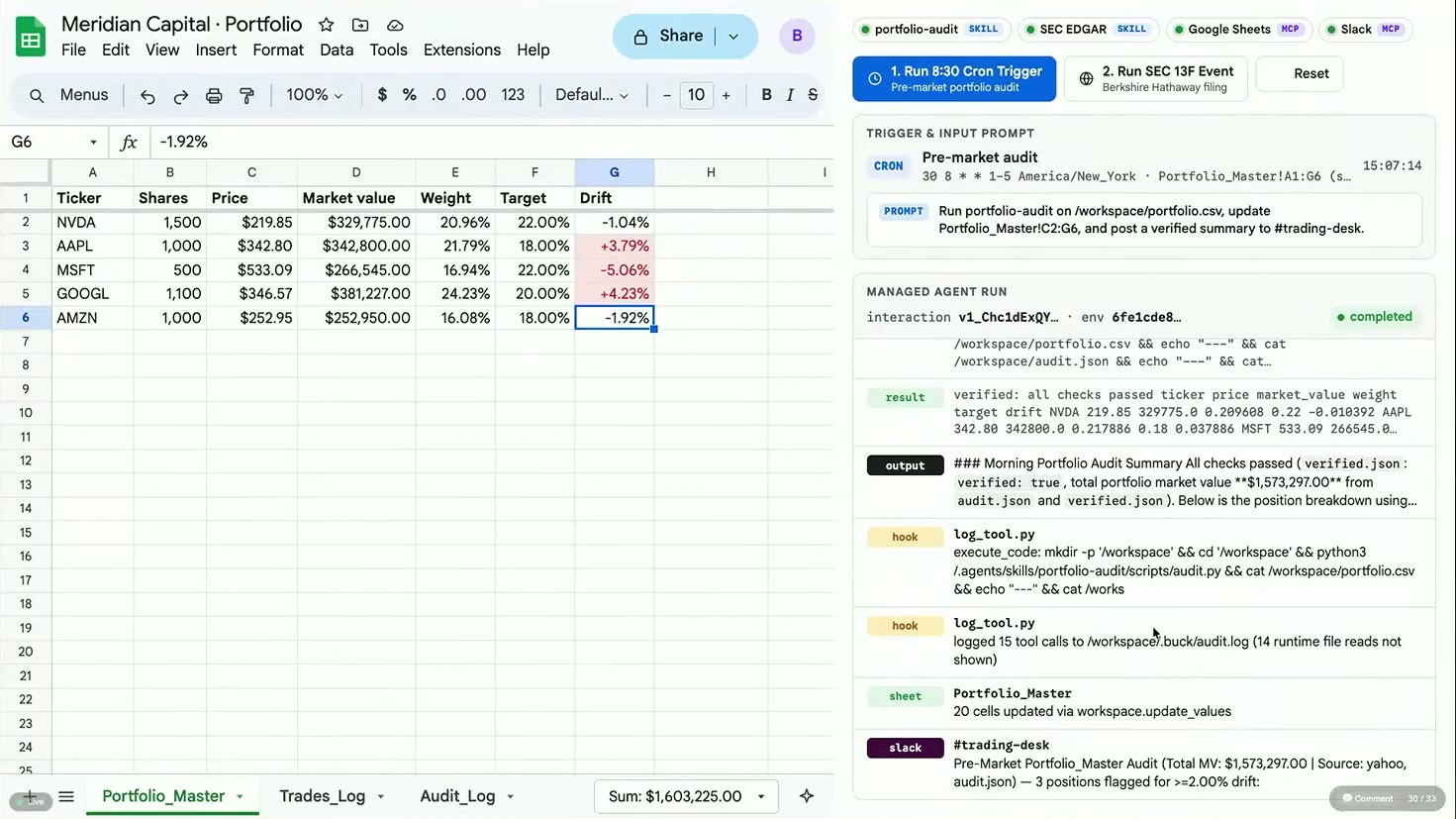
调用金融服务,并尝试查看市场或股价是否发生变化。最后,希望它能更新我们自己的 Google Sheets,整个过程完全自动化。它还在继续处理,已经有了初步结果,并根据触发器更新 Google Sheet。这个触发器会在每天上午 8:30 运行,你不需要做任何事。当然,如果智能体可以访问 Slack,它甚至可以在特定的交易频道里发消息,说明发生了什么变化、目前情况如何,以及它的工作方式。这里还有一个示例,我可以直接
calls financial services, tries to see, okay, did the market or the stock price change? And then at the end, hopefully it should update our own Google Sheets completely automatically. so it's still working through it, it has some first result and it updates the Google Sheet based on the trigger and that trigger would run every 8.30am without you needing to do anything and then of course if the agent has access to Slack then it can even post in some specific trading channel okay what changed, what is going on, how does it work and here we have an example where I can just
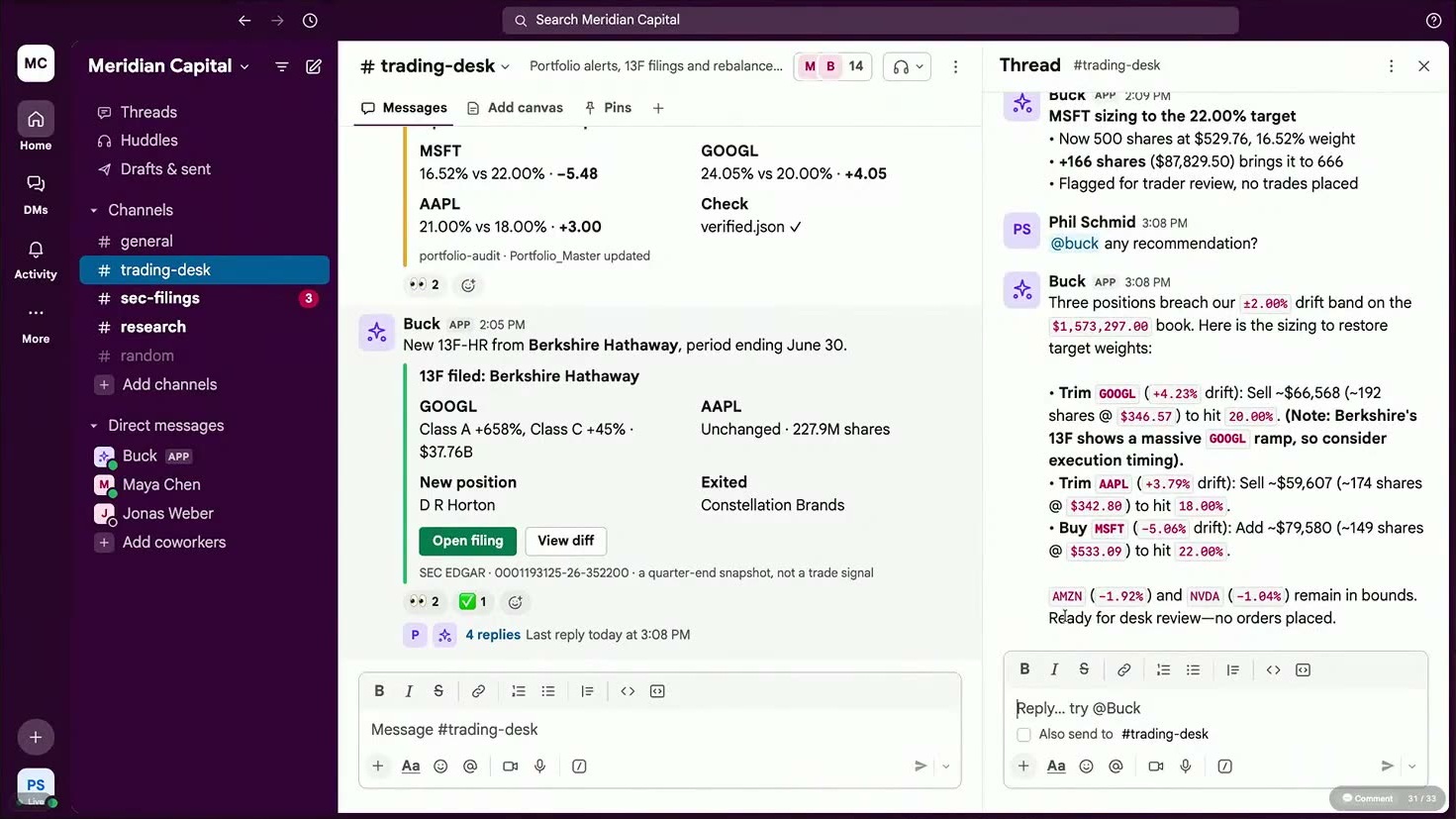
问 Buck有没有什么建议。希望这个演示也能正常运行。这需要一点时间。你们在另一个演示中也看到过这些内容。很好,它给出了3 个持仓建议,这是根据这个线程里的内容得出的,因此它能访问之前的所有轮次,并提供背景信息,说明发生了什么变化。不过它基本上仍然不会根据你提供的系统指令采取行动。运行这个智能体所需的所有基础设施都属于 Managed Agents 环境的一部分。这样你就能轻松开始,把智能体集成到你已经在使用的工具中,提供所需的系统,然后开始使用。
ask Buck any recommendation and hopefully this works as well so it takes a little bit of time, you have seen in the other demo, we have seen all of that perfect, so there are three positions, so that's based on like this thread content so it has all of the previous turns available and it provides the context of what changed, but it's still basically not taking actions based on the system instructions you gave and all of the infrastructure you need to run that agent is part of the managed agents environment. So it's very easy for you to get started, to integrate those into the tools you already use, provide the systems you need, and then to get started.
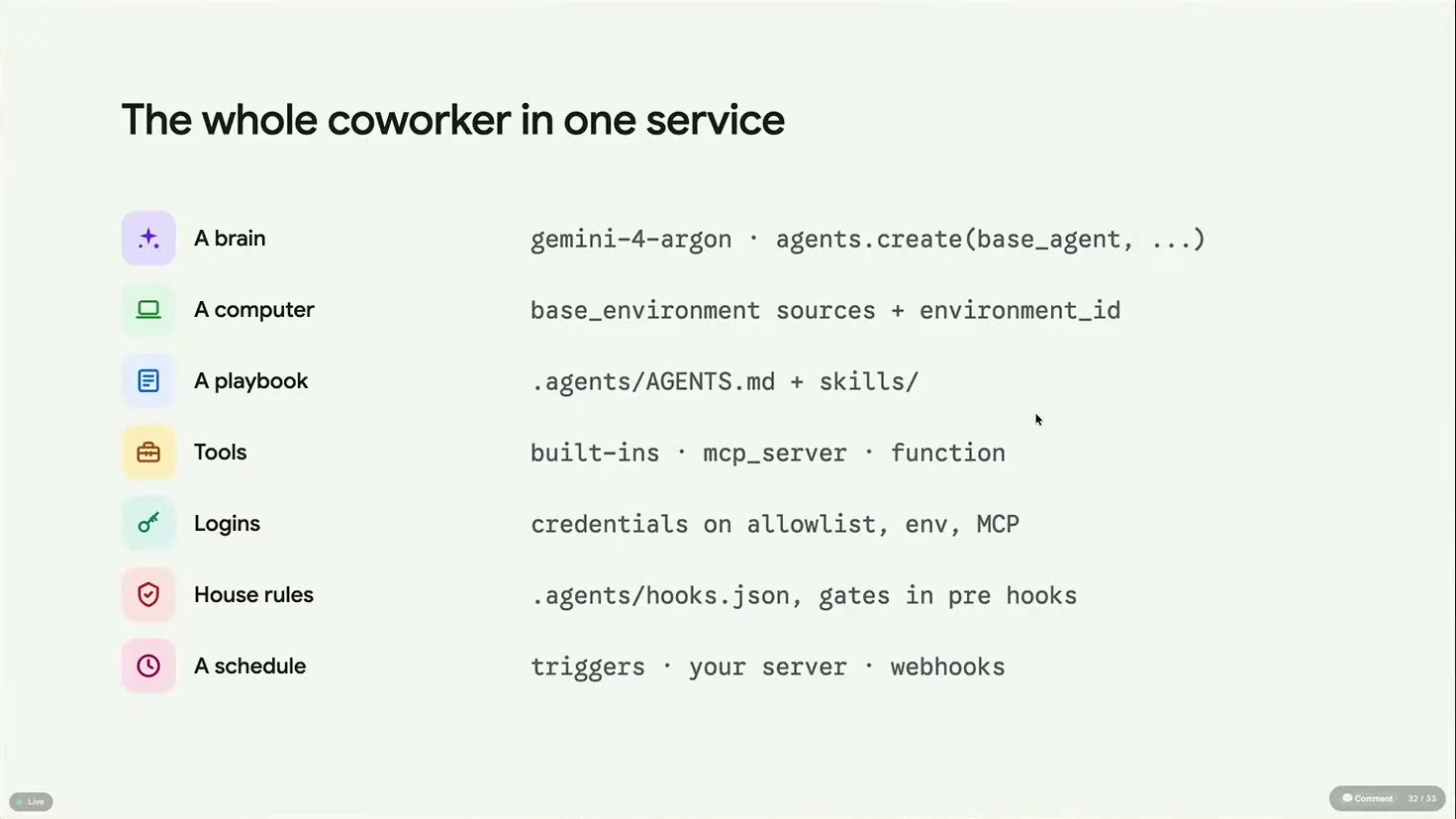
回到幻灯片。整个协作伙伴所需的一切都包含在一个服务中:大脑 Gemini。还有 Managed Agents 提供的电脑。你可以为同一智能体提供技能,也许这些技能原本就在你的本地电脑上。你可以使用工具。你可以提供 MCP 服务器,连接外部服务,以及数据提供商。我们提供安全的凭证配置方式,也可以轮换凭证。我们提供钩子来保护特定的确定性逻辑。当然,我们还有触发器,帮助你更主动地将智能体集成到工作流程中。感谢大家聆听,希望你们能去招聘自己的第一位 AI 协作伙伴。谢谢。
Back to the slide. So the whole co-worker, which we need in one service, we have the brain, Gemini. We have the computer with managed agents. We can provide skills for the same agents you use, maybe on your local computer. You can use the tools. You can provide MCP server for external services, data providers to connect. We have a secure way for you to provide credentials to rotate credentials. We have hooks to protect certain deterministic logic. And of course, we have triggers to much more proactively integrate it into it. So thanks for listening, and hopefully go hire your first AI co-worker. Thank you.